CMMS news: BIM, QR codes and maintenance plans | April 2022

Find the summary of the new features that appeared in your CMMS application during the month of March 2022. On the agenda: new BIM integration developed with RS Components, optimization of new tasks, research, printing, etc.
Discover updates in your application
Display your equipment in 3D in Mobility Work thanks to BIM technology
Mobility Work Now allows you to visualize your equipment in 3D in your CMMS application. The integration of BIM (Building Information Modeling) technology into our application is the result of joint work with our partners RS Components, 1st Horizon and Sitedesk.
Mobility Work thus becomes the only CMMS solution that integrates a BIM vision directly into its application, and RS Components is the only distributor to provide its customers with such a range of maintenance solutions through its RS iMaintenance ecosystem.
Read the full article gold Contact us for more information on this integration!
Add a sorting option to the list of labels
Administrator profiles can now release their list of labels by label group, by alphabetical order of labels or order of IDs, in ascending or descending order.
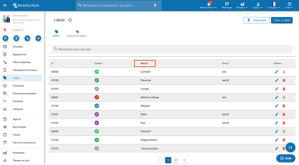
Example of sorting in alphabetical order
In addition, it is now possible to edit the default labels.
What's new in research
Download all of your QR codes in a zip file
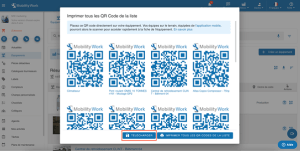
It is now possible to Download all the QR codes associated with network equipment in image format (.png), grouped in a.zip folder, which allows you to choose your printing system.
All uploaded images are the same size. It is thus possible to Choose between group or individual printing of QR codes.
To do this, simply click on “Download” after clicking on the QR code pictogram in the Equipment or search menu.
New “Apply filters” button in the search

Search Sorting Is No Longer Automatic : to apply the filters to your search, you should now click on “Apply filters”.
What's new in tasks
The interface for tasks resulting from a new version maintenance plan now allows you toShow the previous and next occurrence on the tasks of the new maintenance plans in progress.
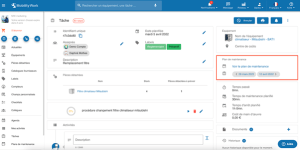
The new version task print button has been improved for more simplicity and ergonomics.

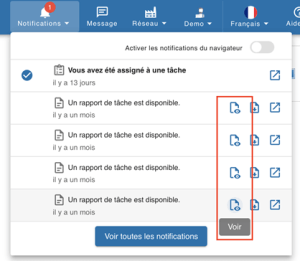
It is now possible to view a task report from a notification without having to download it by clicking on the pictogram, which will open a new window.
A Novelty in the Equipment Sheet
The listing of tasks in the equipment sheet has been improved, as has the search. It is now possible to both sort tasks by increasing or decreasing dates.

Any questions?
Contact us to discover the first CMMS that can be deployed in 3 weeks.