Manage with tags: organize your CMMS around your own criteria
Structure your assets and maintenance operations around your processes with custom tags, without being locked into a fixed hierarchy.













Customize your data structure and gain agility

Save time by simplifying your searches

Immediate adoption thanks to clear, meaningful tags for your teams
What is a tag in Mobility Work CMMS?
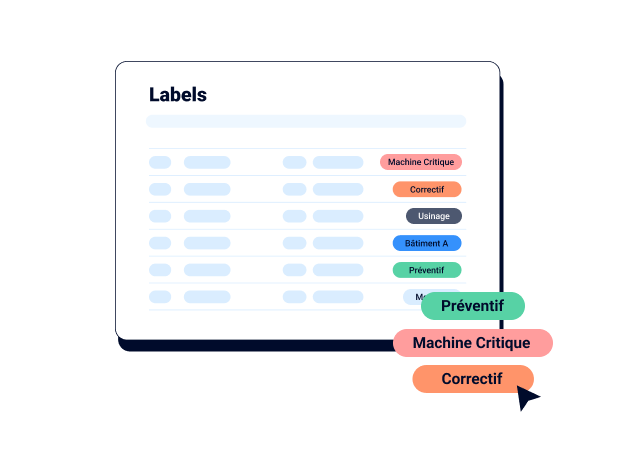
A tag is a custom label you attach to an asset, a spare part, a work order or an entire maintenance plan to describe it: its location, production line, criticality, type of maintenance or the nature of the failure.
Tags help you group information (filter, count and analyze). While most maintenance software imposes screens with around a hundred predefined fields, Mobility Work lets you define only the information your department needs.
The difference from a traditional hierarchy is structural. In a tree, each asset occupies just one position (site, workshop, line, machine), and any reorganization requires reworking the hierarchy. With tags, the same asset can carry several labels at once, so you can find it from several perspectives without duplicating data or rebuilding your asset structure.
Classify your assets without the complexity of hierarchies

For example, a hydraulic press can carry the tags “Workshop B”, “Criticality A”, “Hydraulic” and “Under contract” at the same time. The maintenance manager filters critical assets, the technician finds all hydraulic assets within their scope, and the buyer identifies those covered by a supplier contract, all from the same asset record. You can also generate a list of assets grouped by tag in seconds.
Because tags use the plant’s own vocabulary (internal identifiers, line names and electrical cabinet codes), searching feels natural for field teams. A technician who enters a cabinet identifier in the mobile app goes straight to its history and documentation without knowing its full path in a tree. For physical machine identification, explore our mobile app and asset management.
Classify your maintenance operations with automatically assigned tags
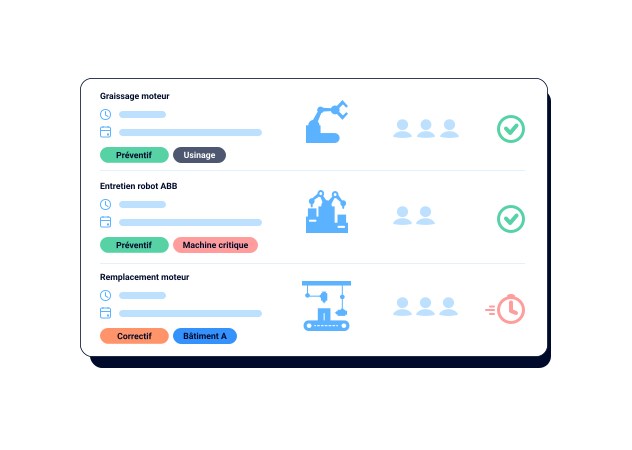
Maintenance plan tasks automatically inherit the assigned tags, so each task is fully described when it needs to be carried out.
Failure categories that reflect your operations
You define your own failure categories. A food-processing site might distinguish cleaning-related stoppages, sealing defects and electrical failures, while a foundry would track tool wear and thermal incidents. Each work order is linked to an identifiable cause, making the lessons learned genuinely actionable.
Automatic work order tagging
When maintenance is carried out on a tagged asset, its tags are automatically added to the work order (called a “task” in the Mobility Work app). The technician has no extra data to enter, and the data stays consistent, ensuring reliable traceability even when several teams work on the same machine.
Tag-based analysis in your dashboards
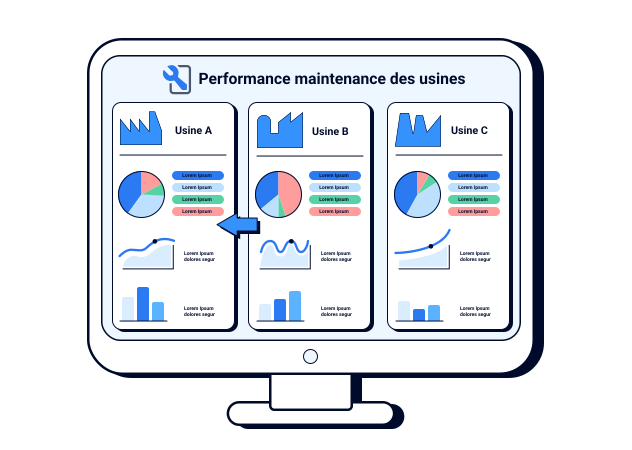
In the dashboard, task analysis ranks your ten most used tags from three angles: maintenance time, number of tasks and number of activities. You immediately see which failure categories keep your teams busy, which asset groups account for maintenance costs and where to strengthen skills, for example by training more technicians in electrical work if that tag predominates. This analysis complements your maintenance indicators.
Standardize practices across sites with shared tags
Within an industrial group, each plant has often developed its own coding system, making comparisons impossible. In Mobility Work, tags are defined by network administrators and cannot be changed by other users. This governance establishes a common reference framework (failure categories, criticality levels and asset families) while letting each site manage its daily operations.
Once tags are standardized, you consolidate and compare the right data in your dashboards: time spent on electrical failures by plant, share of preventive work orders and the most heavily used critical assets. Management has a reliable foundation to optimize resources and decide on the group’s maintenance strategy. For advanced needs, your data also flows into your BI tools through our integrations.
This is what groups deploying Mobility Work at scale seek, including Saint-Gobain Sekurit, a user since 2018 with 90% worldwide coverage. To see the full process of structuring an asset portfolio, explore our asset classification use case.

CMMS requirements specification
Designed for demanding industrial projects.
Structure your functional framework and manage your RFP process with confidence.
Why Mobility Work put tags at the heart of its CMMS
Mobility Work was born from an observation its founders shared in the field: traditional maintenance software forces teams to adapt to a structure designed by the vendor, rather than the other way around. The platform was designed as a simple, intuitive, collaborative, community-based tool for an industrial group with multiple sites and activities.
This community dimension gave the team a unique vantage point. Through conversations, the same need kept coming up: each plant wanted to find its assets using its own words, track its own failure categories and compare its sites without rebuilding its reference framework. Fixed hierarchies met none of these expectations. Tags were the direct answer and were then refined through user feedback (tag groups, tag-based dashboard analysis and automatic assignment to work orders).
Today, the platform contains more than one million assets and 7 million maintenance hours, has over 45,000 users, and the company is ISO 27001 certified. Every improvement to tag-based management builds on this accumulated experience.
They organize their maintenance with Mobility Work

In practical terms, it saves us time and helps us be more efficient. It makes it easier to solve problems by searching the history and to spot recurring issues when we look at the number of breakdowns on a machine. We can then adapt or change our methods accordingly.

Mobility Work helped us address one of our biggest challenges: maintenance management. The solution enabled us to structure our maintenance processes with a user-friendly tool that improves communication between production and maintenance teams. By standardizing the tool across all our sites, we improved efficiency, consistency and collaboration.


We have used Mobility-Work for CMMS since 2018. The tool has increased the autonomy of production teams and enabled precise tracking of time, costs, assets and maintenance work. Intuitive and highly configurable, Mobility-Work centralizes tasks, machine histories, documentation and spare parts management without administrative complexity. We highly recommend using it.
Frequently asked questions about tag-based management

What is the difference between tags and a hierarchy in a CMMS?
Can tags preserve a site, workshop and line structure?
Who can create and edit tags?
Are tags automatically added to work orders?
How can tags be used in maintenance indicators?
Can we reuse our existing coding system during deployment?
Try tag-based management with your own assets
Contact us to discover the first CMMS that can be deployed in 3 weeks and work with our experts to build a tag structure suited to your organization.