CMMS news: navigation and display improvements | July 2022

Find the summary of the new features that appeared in your CMMS application during the month of June 2022. On the agenda this month: various improvements to make it easier to navigate and use the application.
Discover updates in your application
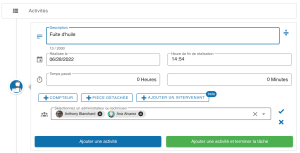
Add multiple actors when creating an activity
It is now possible toadd multiple speakers (administrators or technicians) when entering a new activity.
Available from the premium plan, this feature allows, when creating an activity, to add participants, which will allow the creation of as many activities as there are speakers.
Thus, during several interventions, a single participant can do the entry for the others, which will allow his team to save input time.
Associate links to tasks or maintenance plans
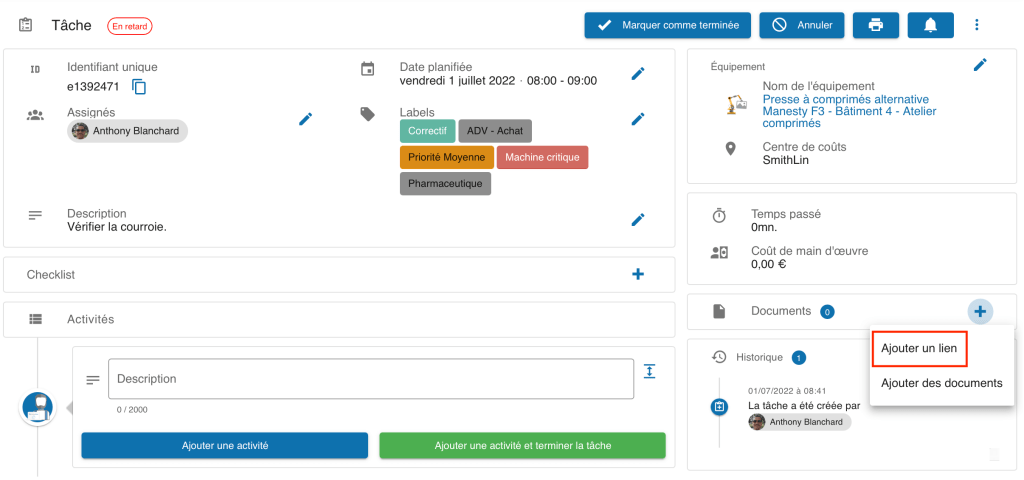
Now you can add “link” documents on tasks or maintenance plans (for networks with their new version) from the task page.
New explanatory notes
Explanatory notes have been added to facilitate the use of the application:
- Explanatory note until a user accepts the invitation to join a network;
- Explanatory note at the overview of the assignment notification to a task;
- Explanatory note when deleting a user.
In addition, the price plan corresponding to your network is displayed in the navigation sidebar, and you can request an express quote by hovering over it and clicking on the corresponding icon.
Usability and display improvements
It is now possible tocancel a mandatory step completed by mistake in the checklists, which will allow you to go back and thus avoid communication problems within a team.
In addition, the display of equipment names has been optimized: The name of the equipment now appears in full in the detailed sheet of a task.
Any questions?
Contact us to discover the first CMMS that can be deployed in 3 weeks.