CMMS configuration: what are the deployment steps?

You are part of a small business, an SME or a large group and you want to update your maintenance service by adopting a new CMMS solution.
Once laborious, expensive and time-consuming, this step is now much easier and more affordable thanks to maintenance 4.0 solutions. The portability, maneuverability, and usability of the tools allow for rapid and effective adoption by the maintenance team. Among these tools, Mobility Work stands out: our application is designed to allow you to quickly measure the benefits on your maintenance service and to improve their management. The configuration in a few minutes and the easy and intuitive use make it a particularly attractive solution.
Our application does not require any infrastructure and is hosted in SaaS mode in the cloud, which allows you to do without the intervention of a qualified IT team. The deployment of our next-generation CMMS solution includes the following steps:
CMMS promise a quick and easy implementation
First step: equipment, maintenance history (work orders, work orders, intervention requests), spare parts, etc.
Before you can use Mobility Work maintenance software, you must of course create or integrate your data, depending on the state of maturity of your company with respect to the current use of CMMS software. This tedious step is generally charged by CMMS editors: users have no choice but to pay for training to create their database, or to pay for the integration of their old maintenance data into their new asset management software.
At Mobility Work, we believe that in order to evaluate our application, we must allow maintenance managers to test their new maintenance application with their own data, and all this for free. The time for month-long training courses and the difficult configuration is over.
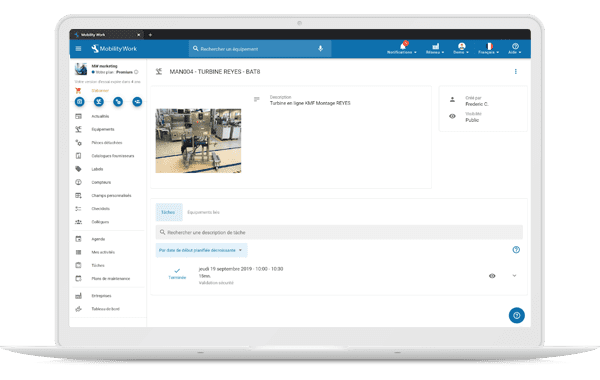
Access all documents (photos, videos, etc.) and checklists from the equipment sheet in your Mobility Work application
Contact us via the application's support page and we will integrate all of your data for free, regardless of their format (excel file, base access, etc.) or their origin (old CMMS software).
If you are starting from scratch and your maintenance department does not currently have any data, know that the creation of equipment is done very quickly. Phone in hand, you can create your equipment in a few seconds: equipment name, description, cost center, photo, and done! For more information on creating equipment, feel free to watch our tutorial.
Second step: set up your data in a few clicks
Mobility Work was developed to avoid the preformatted grids that can be customized as desired by the majority of current publishers, and which represent a real gas factory for maintenance technicians. To avoid spending an entire month choosing which fields you want to add or remove, we have developed a system of labels - or tags. The idea is simple: tag a set of elements, your maintenance interventions for example (preventive, corrective, etc.), your equipment (pressure vessels, contract equipment, etc.) and your users (team 1, team 2, etc.) in order to quickly come up with finer analyses, but also to improve the management of your interventions, in particular their planning for a group of users. This is an essential step in setting up your CMMS software. If you want to know more, we invite you to consult our tutorial on tags.
Step 3: Start the trial and integrate your first users
In a few seconds, you will understand that Mobility Work requires no training and no configuration thanks to its very simplified user interface. You will thus be able to create your first interventions and your first maintenance plans, and to add your documentation. The potential and benefits of Mobility Work on your maintenance department are quickly measurable, whether your team has one or 120 technicians.
You can then quickly provide access to a few technicians and measure the benefits that Mobility Work can bring them on a daily basis. Indeed, if access to information and data entry are simplified, then they will not see it as a surveillance tool, but rather as a daily aid.
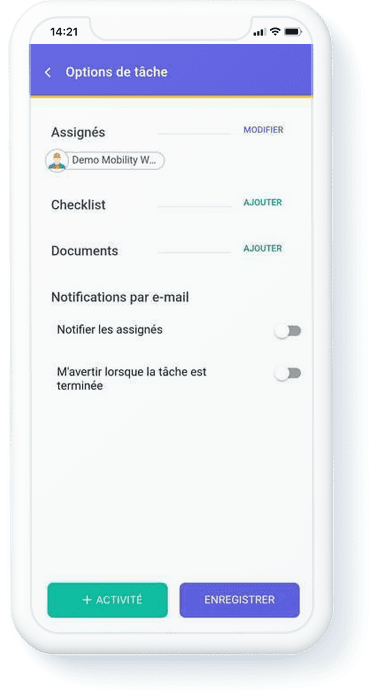
Questions during your free trial?
A technical question about a problem, or need advice concerning the use of a feature of our CMMS software? Use the in-app chat at any time to contact our support team, which is responsive, easy to access and free of charge.
And what's next?
Once your 7-day trial is over, we review the use of our application with you.
The price of Mobility Work is the lowest on the market since it only includes the maintenance technician and administrator profiles in the application for a price of 33 euros/month/profile. We do not charge for production profiles and service providers. Price includes data integration, application support, and updates every two weeks.
No more 50,000 euro software and outdated interfaces! Mobility Work offers its users a tool that is both efficient, affordable, collaborative and easy to use. We offer you all the keys to successfully transition to maintenance 4.0 and to the achievement of your goals. If you want to know more, do not hesitate to contact us in order to schedule a personalized presentation of our CMMS software.
Are you interested in maintenance management and want to know more in order to increase your productivity and save money? Schedule a call with our team !
Any questions?
Contact us to discover the first CMMS that can be deployed in 3 weeks.