CMMS: Improve the maintenance of your automated systems

Manage the maintenance of your automated systems thanks to a CMMS
More and more industries are deploying automated systems and are looking for specific skills to maintain their drives, controllers, circuit breakers, assembly lines, CNC, etc. Maintenance service electricians who use a GMAO, are increasingly required to work on automation applications and to frequently troubleshoot various systems. Maintaining an automated system generally involves the use of additional staff and expenses, but with the right tools, interventions can be greatly facilitated and significant benefits generated.
There are several methods that, combined with data from your Mobility Work maintenance application, can help you better manage the troubleshooting of your automated systems.
Enquire
- Get as much information as possible from the production operator to better understand the outage environment. The more information you gather (what works or doesn't work), the better you can diagnose troubleshooting.
- Consult all the machine information from your CMMS software (technical documentation of the machine, history of interventions, history of interventions, troubleshooting procedure, documentation on setting the machine, functional analyses such as Grafcet and GEMMA, etc. To facilitate access to all this information, etc. To facilitate access to all this information, a large number of companies deploy Mobility Work and integrate QR codes on their machines. Thus, technicians can access all machine information by scanning the QR code with their smartphone.
Formulate hypotheses
- Thanks to all the information retrieved previously, you can begin to list by relevance all the causes that may have led to the failure of the automated system.
Define your scope of intervention
- Register all equipment before any intervention. The list of equipment is available in your Mobility Work CMMS software, from the web and mobile version (Android and iOS).
- Verify all of the previous hypotheses, starting with the one whose cause seems to be the most likely and easiest to achieve.
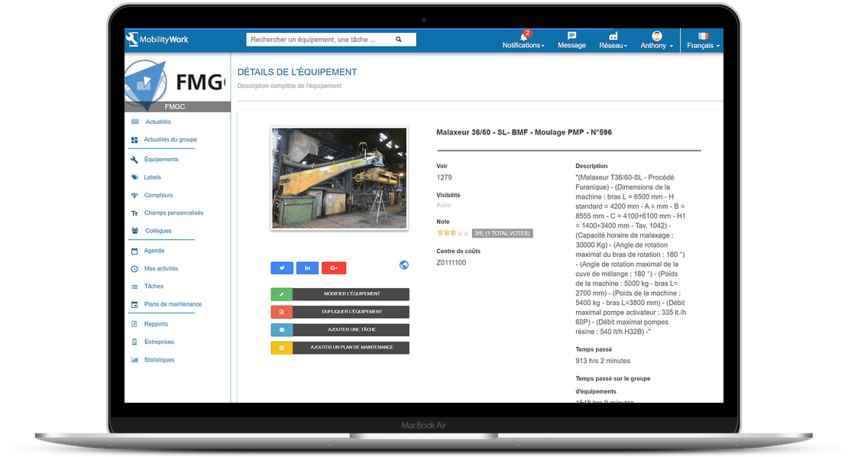
All information relating to the equipment is available from its dedicated sheet in the Mobility Work maintenance management application: description, image, documents, preventive maintenance plans, etc.
Repair your equipment
Once the failure has been located, a technician must repair the installations. There are 2 possibilities:
- Temporary operation of the machine. This is then a troubleshooting intervention and a maintenance technician will have to intervene later to complete the operation.
- Functional machine: the intervention is over and can then be defined as a repair operation and not a repair operation.
Control the on and off modes of your equipment
- Thanks to various tools such as the GEMMA (Guide d'Étude de Modes de de On/Off), you can control all the equipment and manage its start and stop.
Develop intervention reports
- One of the most important steps to monitor your operations and improve future troubleshooting on your automated system is to enter the interventions in your Mobility Work maintenance application: signs of failure encountered, stakeholders, date of the intervention, type of operation (preventive, electrical, corrective or automated), and finally, the operation performed to repair the equipment. Mobility Work offers its users a mobile and user-friendly application that improves the intelligence of maintenance operations while allowing the integration of multimedia documents such as photos or videos. All of this information can be useful if a similar failure occurs on the same automated equipment.
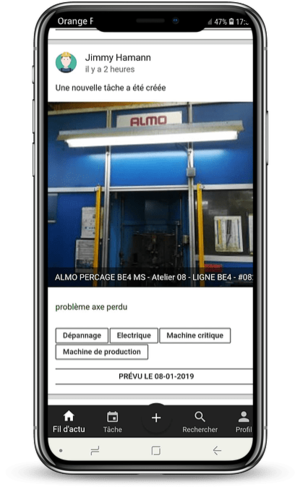
All the news relating to current interventions are available from the news feed of the Mobility Work mobile application, available on iOS and Android
Performing a troubleshooting procedure on an automated system
When a failure occurs on an automated system and a troubleshooting operation is required, it is of crucial importance to approach the problem correctly and ask the right questions in order to find the origin of the problem in order to solve it.
For example:
Does the system start up?
If the answer is no, then you need to check if the energy flows are present and in accordance with the requirements of the asset.
Is the command part initialized?
If the answer is no, you need to initialize it by init or manually.
Is the operative part initialized?
If the answer is no, you must return the operative part to the initial conditions.
Are the initial conditions present?
If the answer is no, you must then check the control part: Receptivity: links — sensor — PLC inputs. If the answer is yes, you should check the PLC part: Link: PLC output, preactuators and actuators.
Is the cycle going normally?
If the answer is no, you should look for the stage where the cycle stopped.
Did the associated actions take place entirely?
If the answer is no, you must then check the operational part: connection between preactuators and actuators. If the answer is yes, you should check the conditions of evolution: receptivity associated with this stage.
Reach out to the community
If you are still unable to resolve the failure on your automated system, Mobility Work offers a community platform that allows you to exchange knowledge with thousands of maintenance professionals. The 1st maintenance social network allows you to connect directly with all these technicians and to engage in a dialogue concerning your problem. Some of them may have already encountered the same problem as you and therefore probably already registered in their CMMS.
Inspired by the latest digital trends, Industry 4.0 and smart manufacturing, Mobility Work is a versatile, dynamic and comprehensive CMMS solution that facilitates your daily maintenance tasks and helps you collaborate with colleagues or industry professionals from other sectors, all directly from your smartphone.
Are you interested in maintenance management and want to know more in order to increase your productivity and save money?
Any questions?
Contact us to discover the first CMMS that can be deployed in 3 weeks.