Why Your CMMS Needs to Talk to Your ERP (and How to Get There)

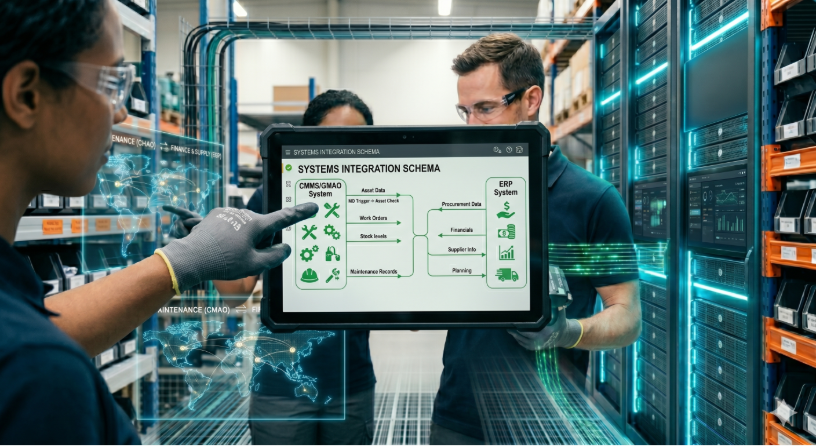
Your ERP knows the cost of parts, your MES tracks production rates, your sensors measure vibrations — but your CMMS lives in its own world. The result: technicians manually re-enter intervention data, the maintenance manager waits 48 hours to see the cost impact of downtime, and no one knows in real time whether the spare parts stock is sufficient to cover the week's preventive tasks.
This siloing isn't a minor inconvenience. It's a structural barrier to industrial performance.
The Real Problem: Data That Doesn't Flow
On most industrial sites, maintenance data exists — it's simply scattered. The ERP holds part references and budgets. The MES records machine downtime. The CMMS stores intervention history. But these systems don't talk to each other, or barely.
The consequences are concrete. A technician closes a task in the CMMS, then re-enters the same information in the ERP to trigger a parts order. A maintenance manager exports an Excel file from the CMMS, reworks it, then loads it into a BI tool to prepare the monthly report. Every re-entry is a source of error, additional delay, and a waste of skilled time.
The gap between the data available in your OT systems (sensors, PLCs) and field action is what industrialists call the **execution gap**: the signals exist, but they never reach the people who need to act on them.
Connecting the CMMS to the Rest of the Plant: APIs and Webhooks
The solution involves two complementary mechanisms: APIs to push and retrieve data on demand, and webhooks to react in real time to events.
An API allows your ERP to create equipment records, send counter readings, or trigger a preventive maintenance plan directly in the CMMS — without human intervention. A webhook does the reverse: as soon as a task is closed or a spare part falls below the minimum stock threshold, the CMMS instantly notifies your ERP or BI tool.
In practice, the ERP integration scenario looks like this: your ERP creates equipment records via the API with their internal references. When a technician closes a task in the CMMS, a webhook automatically transmits the intervention data — duration, spare parts consumed, counter reading — to the ERP. Replenishment triggers without anyone copy-pasting anything.
With Mobility Work, the connection covers the entire chain — equipment, spare parts, tasks, counter readings. Your systems are automatically notified at each key event: task closure, part consumption, stockout. Maintenance plans can even be triggered directly from a counter reading transmitted by a sensor, enabling a shift from calendar-based preventive maintenance to usage-based maintenance.
Beyond the ERP: Sensors and Reporting
The integration isn't limited to ERP synchronization. Two other connections change the picture.
The first is the sensors → CMMS connection. When a vibration or temperature sensor detects a drift, a counter reading sent via the API can automatically trigger a maintenance task. The technician receives the notification on the mobile application with full context: which equipment, which threshold was exceeded, which procedure to follow.
The second is the **CMMS → BI** connection. The Data Connector exports maintenance data to Power BI or Metabase to build custom dashboards: preventive/corrective ratio by site, maintenance cost per equipment, plan completion rates.
Three Steps to Connect Your CMMS
1. Map the data flows between your systems. Identify manual re-entries: every copy-paste between two applications is a flow that's a candidate for automation.
2. Start with one simple, bidirectional flow. Synchronizing equipment and task closures between CMMS and ERP covers most immediate needs. A webhook on spare parts consumption automates replenishment.
3. Measure the gain : Compare the time spent on re-entry before and after the integration. The return is often visible within a few weeks.
Connecting the CMMS isn't an 18-month IT project. It's a progressive connection, flow by flow, that makes maintenance data usable where it has the most value — in the ERP, in the MES, on the plant manager's dashboard.
Any questions?
Contact us to discover the first CMMS that can be deployed in 3 weeks.