Sync Your Equipment Without CSV Export: The Equipment Search API

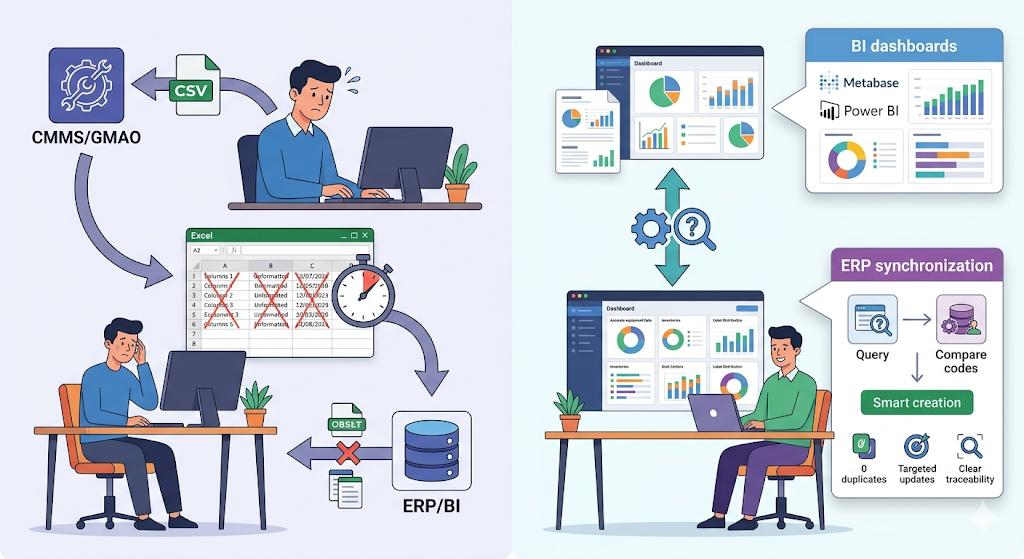
Every Monday morning, the same routine: export the equipment list from the CMMS, open the file in Excel, remove unnecessary columns, reformat dates, then upload the result into the ERP or BI tool. The file is already outdated by the time it reaches its destination. And if a piece of equipment was archived or a tag changed in the meantime, no one will know until the next export.
This workflow of intermediate files becomes a bottleneck as soon as your systems need up-to-date data.
Query the CMMS as a Data Source
An equipment search API allows your third-party systems — ERP, BI tool, internal dashboard — to query the CMMS directly and get the equipment list they need. No more intermediate CSV files: the request goes out, the response comes back with current data.
You can filter by cost center, by tags (with AND or OR logic), by item code, or choose whether to include archived equipment. Results are paginated and sortable by creation date, last update, or archive date.
The response includes each equipment's name, description, cost center, item code, tags, and key dates. Enough to feed a dashboard or compare against an external reference system.
Feed a Dashboard with Your Equipment Registry
Some teams build their own views in Power BI or Metabase by cross-referencing multiple data sources. The search API gives them access to the CMMS equipment registry without going through a CSV export: asset inventory by cost center, breakdown by tags, detection of equipment missing an item code.
This data is meant to enrich an existing dashboard — cross-referencing the CMMS registry with ERP or MES data — rather than building maintenance KPIs from scratch. The CMMS built-in analytics module remains the right tool for operational indicators like the preventive-to-corrective ratio or costs per equipment.
Drive ERP-to-CMMS Synchronization
When the ERP is the master system for the equipment registry, the challenge isn't just pushing data into the CMMS. It's knowing what already exists before creating or updating.
Without a search API, the typical approach is to push everything in bulk and hope duplicates won't slip through. With a search API, the flow becomes intelligent: before each sync, the ERP queries the CMMS by item code to retrieve existing equipment. It compares, then decides what to create via the bulk creation endpoint and what to update via the attribute update endpoint.
The result: zero duplicates, targeted updates, and clear traceability of what changed at each synchronization. The integrator knows exactly how many pieces of equipment were created, how many updated, and which ones stayed the same.
Three Steps to Get Started
- Identify the priority flow. Which system needs up-to-date equipment data — your BI tool, your ERP, an internal dashboard? The flow that currently generates the most manual exports is the right candidate.
- Start with a simple query. Filtering by cost center or tag covers most needs. Add combined filters once the first flow is in production.
- Automate. A scheduled script running every hour replaces a weekly export — and the data is always fresh.
The equipment search API doesn't replace the CMMS interface. It opens your asset data to the systems that need it, without intermediate files and without delay.
Any questions?
Contact us to discover the first CMMS that can be deployed in 3 weeks.