Analyze your maintenance indicators in your CMMS
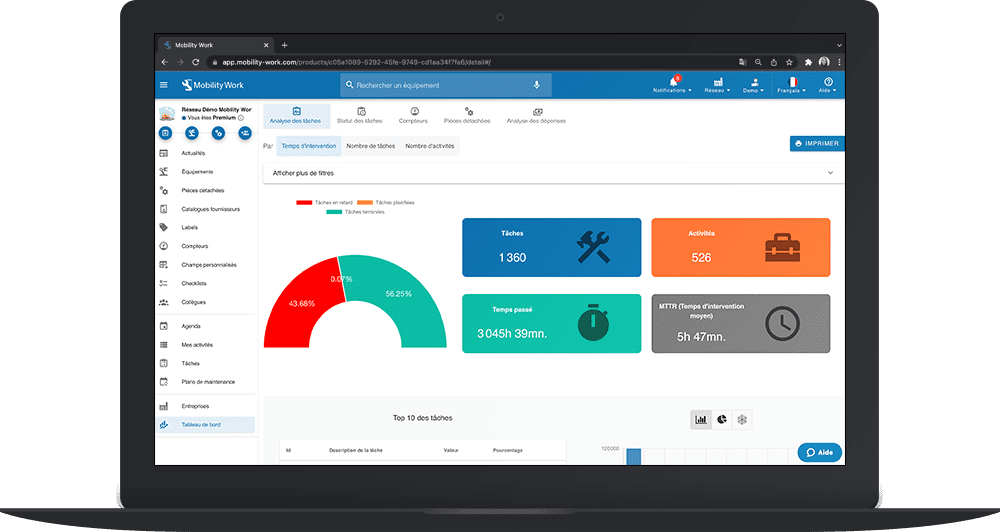
The configuration of your CMMS software, user training and the presence of maintenance data are a good starting point. The first step is to collect data, but you have to know next analyze maintenance indicators. Unfortunately, traditional maintenance software is often not very intuitive and requires technical knowledge. The Mobility Work CMMS dashboard has a analytical tool integrated to make the most of your maintenance data and improve your preventive maintenance.
CMMS and data analysis
Maintenance data collection is sometimes complex with traditional tools. Technical computer skills are often required. Many maintenance services still rely on complex Excel files that need to be kept up to date manually. From this data, monthly maintenance indicators are calculated. Like any manual operation, you are not immune to any error. The analytical tool of Mobility Work CMMS automatically collects and aggregates all your maintenance data.
“Maintain or invest?“We think that this is the main problem for any maintenance manager. To answer this question, the user must have a certain amount of information from several systems. Of CMMS applications such as Mobility Work record intervention times, downtime or The consumption of spare parts. ERPs compile inventory levels, orders for goods and external services. Mobility Work's analytics tool allows you to collect and display your maintenance data in a simplified view.
Click on the image to enlarge
The scorecard from Mobility Work CMMS compiles the most important maintenance indicators to help you develop your preventive maintenance.
Intervention time
THEanalysis of intervention times and duration of operations is a good start for the performance of your maintenance teams in your CMMS. Two to three weeks of entries will allow you to quickly visualize the advantage of the analytics module of the Mobility Work application.
Filter by date, period, users, labels or even equipment and get an overview:
- the number of tasks;
- the number of maintenance activities;
- total intervention time;
- the average intervention time;
- the proportion of tasks planned, overdue, or completed
Below, your dashboard offers you detailed graphics :
- top 10 tasks;
- top 10 cost centers;
- top 10 equipment;
- top 10 users.
These values are expressed both with the name and the designation of the elements, but also with the Number of associated hours.
Finally, you can visualize The evolution of the past, over the day, the week, the month or the year. Also use your CMMS to monitor the performance of your preventive maintenance strategy. To do this, simply filter the dashboard to show only the tasks of maintenance plan. You can always add filters by label, equipment, user or cost center, in order to refine your analysis.
Maintenance tasks and activities
By navigating through the tabs on your dashboard, you will be able to collect indicators related to your tasks and activitiescreated in your community maintenance management platform. In addition to the indicators mentioned above, you will also find the Top 10 most used keywords when entering your tasks and activities.
Exit the overview and click Task status for a detailed view of planned, ongoing, or completed tasks. You can then choose to display them by users, labels, or cost centers.
Click on the image to enlarge
Counters
Mobility Work CMMS offers you the possibility of create and manage your counters. To collect the associated data, click on the tab Counters from your Dashboard. Select the meter of your choice. If necessary, apply filters. A graph showing the Counter valueover the selected period, as well as a table summarizing the details of surveys carried out.
Associate external data with your CMMS
Some maintenance indicators may be found on tools other than your CMMS. For example, monitoring the spare parts consumption can be done from Mobility Work or from your ERP. It may therefore be necessary for you to cross-reference data from various applications. Our team is here to provide you with information on the connection possibilities of Mobility Work CMMS.
Vous avez des questions ?
Contact us to discover the first CMMS that can be deployed in 3 weeks.