Plan maintenance operations in your CMMS
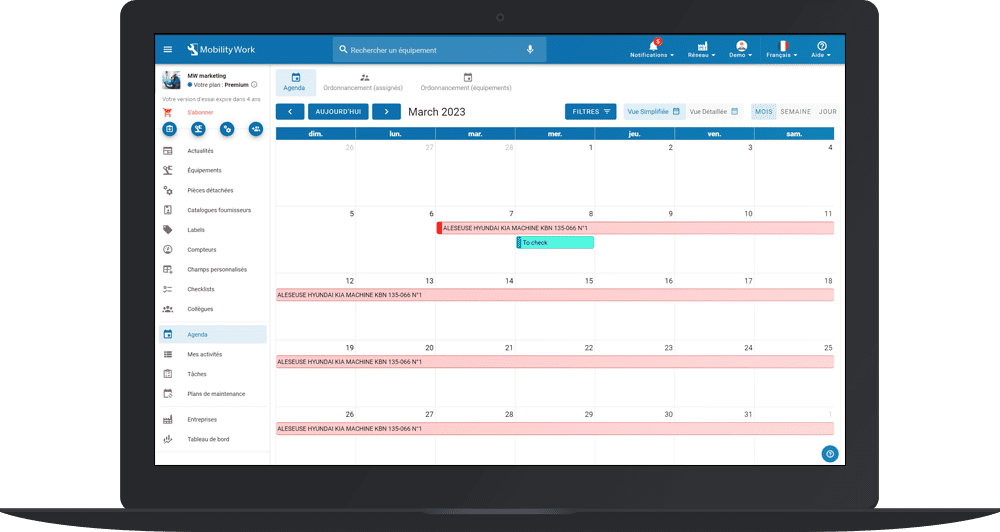
Good maintenance management requires above all the planning of operations in your CMMS tool. Managing the maintenance of a fleet of machines therefore requires a good organization and coordination of technical teams. However, the interfaces of conventional CMMS software are often not very intuitive and do not allow technicians to find information easily.
That's why we decided to rethink information sharing in our community maintenance management platform. Mobility Work CMMS has two modes of visualizing maintenance schedules, for better organization:
- a quick overview of overdue and upcoming interventions in the next 7 days from the home page;
- a detailed view of its schedule via the Agenda feature.
Manage your maintenance schedule in your CMMS
La Calendar feature of your maintenance application allows you and your teams to visualize the tasks, according to a color code:
- Red = overdue tasks
- Yellow = planned tasks
- Green = tasks completed
You can also display or not the tasks contained in a maintenance plan using the associated filter. Depending on your needs, you can also choose to display your agenda for the day, week, month or year, and change the time/date range.
Each task contains a description of the intervention, the equipment concerned, The associated keywords (preventive, mechanical, curative, safety, etc.), the total time spent on the task and the persons involved. The technician can open the maintenance intervention at any time by clicking on it and completing it.
In the same menu, maintenance managers can go to the tab Planner to visualize the schedule of several technicians at the same time. They can also use filters to, for example, only show overdue tasks that have the keyword “preventive.”
Another way for maintenance managers to coordinate their teams would be by using user groups. They can then postpone the tasks by dragging them to the scheduled date. If this task comes out of a maintenance plan, he can decide to postpone the selected task only or to postpone all the following tasks, in order to better organize the work of his teams.
The Calendar feature also allows you to visualize the interventions planned by service providers, maintenance contracts or regulatory interventions directly on its CMMS.
Each piece of equipment also has its own calendar, which allows you to visualize in a few seconds the maintenance operations in progress, completed, late or scheduled for the day, week, month or year. Like technicians, the maintenance manager can postpone a maintenance operation at any time by dragging the task to the desired day. It can also filter operations by selecting a certain number of criteria such as task status, stakeholder groups, etc.
It is possible to report back to your CMMS in the calendar of your equipment sheet a whole range of information from sensors or external systems using Mobility Work APIs.
Vous avez des questions ?
Contact us to discover the first CMMS that can be deployed in 3 weeks.