Manage preventive maintenance plans in your CMMS software
The use of preventive maintenance software is highly recommended to set up maintenance plans.. Even if not all equipment requires the installation of a Strategy of preventive maintenance, because preventive maintenance costs can be higher than those associated with corrective maintenance, a maintenance plan is necessary for any asset that has a critical impact on the activities of your business. Mobility Work CMMS supports you in this process.
Making the choice of preventive maintenance
The functionalities that justify the implementation of a CMMS are often the planning a preventive maintenance plan And theoptimization of intervention management. The aim is to be able to monitor each planned intervention at fixed or variable intervals in real time using its CMMS software, and to ensure that it is carried out correctly.
The planning of your preventive maintenance operations forms the basis of any maintenance service, and is becoming almost mandatory, whether it concerns safety or regulations. It simply ensures the proper functioning of your machines. Les maintenance plans are the guarantors of the proper monitoring of maintenance operations and the traceability of each operation. Moreover, these are often the subject of questions during customer or internal audits.
There are several ways to schedule preventive maintenance operations in your software. It is possible to plan an intervention from a calendar maintenance plan, according to a measured meter value, but also to create work orders based on a value external to the system or from a connected sensor. Programming maintenance plans is generally a complicated step in conventional CMMS software. The idea of the Mobility Work community maintenance management platform is to get closer to the tools of daily life. That's why we've simplified the user interface for creating maintenance plans, so as to make it easier to use while maintaining its efficiency.
Easily create a preventive maintenance plan in Mobility Work software
Create a preventive maintenance plan in a CMMS software
To create a calendar maintenance plan, you need to:
- Select the type of event that you want to create (weekly, monthly, annual).
- Choose the periodicity (every 5 months, every 3 weeks)
- Also choose the number of repeats.
- Select one or more equipments who will be subject to this planning. For example, you can create a maintenance plan for all the cranes in your network.
- Select the techs who will have to carry out maintenance operations. You can select a group of users and, for example, plan a preventive lubrication maintenance operation every month on a granulator for the entire mechanical team. Each technician will be notified of the progress of the operations on which he must intervene.
- Add keywords, in order to optimize theanalysis of your maintenance plans, and provide more information to all users of your CMMS. You can find keywords such as: preventive, mechanical, electrical, production stoppage, safety, environment, etc.
- Determine The deadline, by selecting an end date or a number of occurrences. You can postpone a maintenance operation at any time.
- Determine the Expected downtime of the machine. This information is often provided by production.
- Determine the Expected intervention time. This time will allow production managers to be notified of the potential duration of the planned maintenance intervention.
- Add documenting which will be present on each of the operations, such as maintenance ranges, checklists, spare parts lists, etc. The number of files is not limited, and many formats are authorized (Excel, XLS, CSV, CSV, CSV, CSV, Word, PDF, etc.).
Finally, all you have to do is view your calendar before saving your entry.
Manage your maintenance plans
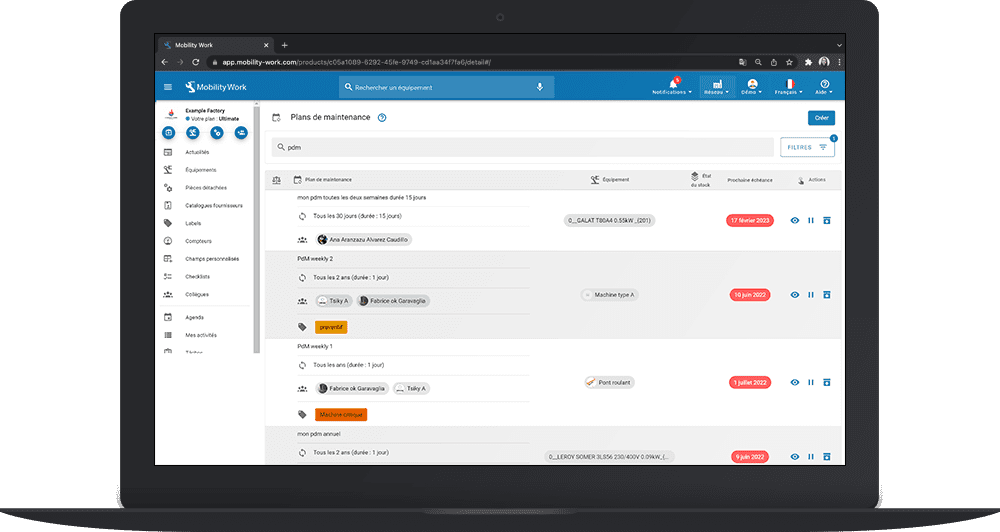
The tab Maintenance plans allows you to visualize:
- the list of your maintenance plans programmed in your CMMS;
- their status (for example, 10 occurrences in progress out of 32);
- the description of the intervention, the name of the equipment, the photo of the equipment, the photo of the equipment, the name of the technician, the associated labels, and the start and end date of each intervention;
- the visualization in the form of a calendar of each of the planned occurrences.
Easily consult your preventive maintenance plans in your CMMS software
You can also pause a maintenance plan or a selection of maintenance plans, and resume launching them at any time. This can come in handy if your factory is shutting down for a long period of time and you want to pause your daily planned activity.
Filter your maintenance plans
You can also apply different filters to sort the list of your maintenance plans in your CMMS:
- filter by keywords present in the description of the intervention;
- filter by start date and end date;
- filter interventions by cost center, which corresponds to the financial or geographical division of your equipment;
- filter according to the status of the maintenance plan (ongoing, paused, and completed);
- filter according to the labels (electrical, preventive, mechanical, mechanical, regulatory, etc.) associated with the maintenance plan;
- filter by user or user group assigned to the maintenance plan.
You can then Show all associated interventions to your maintenance plans via Mobility Work CMMS research. For example, you can:
- to show the intervention time and number of interventions from one or more maintenance plans with the keywords “engine check”;
- to show a List of equipment whether or not they have a scheduled maintenance plan. This list can then be extracted in Excel, PDF, etc. format;
- to display the list of all maintenance plans late on a production line, etc.
Analyze your maintenance plans
Finally, the Mobility Work CMMS analytics module will allow you to optimize the analysis of your maintenance plans. Indeed, the management of 1500 maintenance plans is a first step, but it is then necessary to analyze them in order to refine their relevance. This is why we suggest that you analyze the number of interventions, as well as the average delay per preventive maintenance plan or per equipment.
Thanks to the manufacturer catalogs available on the Mobility Work maintenance management platform, get a list of equipment with their documentation, spare parts and preventive maintenance plans. You can then duplicate your equipment in order to be as close as possible to the official recommendations.
You can ask our support teams at any time to integrate your preventive maintenance plans into the Mobility Work software free of charge.
Vous avez des questions ?
Contact us to discover the first CMMS that can be deployed in 3 weeks.