Create a maintenance work order in your CMMS
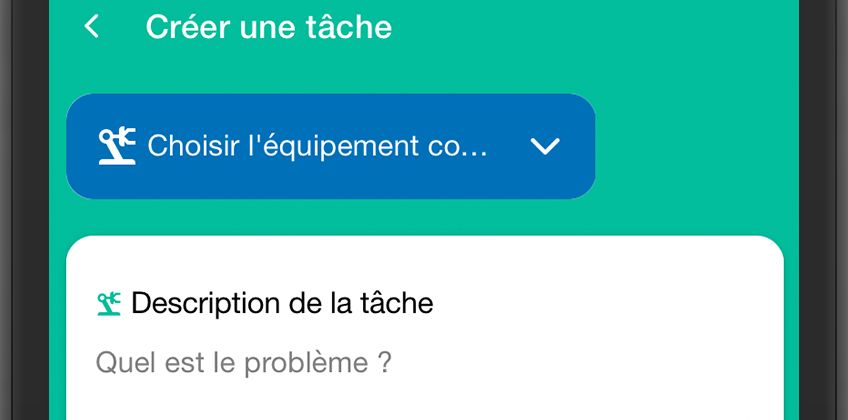
Entering maintenance work orders (OTs) into CMMS software is too often an arduous task for maintenance technicians. They are often confronted with poorly configured screens, which generally require having to fill in a multitude of information in an indefinite number of fields. In addition, information is often very difficult to find and analyze, which leads them to think that entering it will not bring them any added value, and will not improve the management of their daily lives either.
By adopting a Mobile CMMS designed to make the work of maintenance technicians easier, the entry of maintenance work orders is much easier and more accurate and the analysis of maintenance data much more useful.
Capitalize on your expertise thanks to a CMMS
However, it is this daily information that will become the basis for managing your maintenance. In addition to allowing you to follow what is happening from day to day, they will allow you to capitalize on the experience and the Transmission of knowledge maintenance operations on your machine park. All this is essential in order to improve decision-making concerning maintenance operations to be planned, or concerning future machine investments.
La creating a task in your CMMS will allow you to track maintenance operations. To do this, the user must describe the actions to be performed or the problem encountered, as well as the persons supposed to intervene.
You can also associate a work order with a group of users with the same label (“night shift” for example, or “mechanical” workers). You can then choose the planned date of the intervention. All you have to do is add labels (electrical, mechanical, preventive, etc.) that will allow you to obtain a better analysis of the operations carried out thanks to the analytics module. Finally, it is possible to notify assigned users by email of the progress of the maintenance task, the objective being to improve the traceability and monitoring of maintenance operations.
Creating a maintenance work order in the Mobility Work CMMS application
In order to allow you to obtain a more accurate analysis of your operations, we offer To detect recurrent breakdowns thanks to the most used keywords. Spell checkers on phones as well as voice control on your Mobility Work CMMS application will guarantee you better consistency. This will allow you to determine how much time was spent on the motors in your bridge even if the motors have not yet been created in your system. This is made possible thanks to the presence of the keyword “engine” in the description of your intervention.
How to create a maintenance work order in Mobility Work CMMS?
There are several possible circuits for creating a maintenance intervention:
- Repair carried out by a technician : he will quickly describe the problem encountered, add the person who worked with him and the date the maintenance operation was carried out.
- Request for production intervention : he will explain the problem encountered on the machine or the improvement he wishes to make. It will indicate the date of availability of the machine and assign the intervention to the maintenance manager. If the user validates it, he then transmits the task to the people concerned; otherwise, he will archive the task and it will be traced as “not approved” by the maintenance manager.
- Intervention planned by a maintenance manager which will indicate the work to be done, the maintenance personnel, the equipment on which the intervention relates and the expected date.
Once the OT maintenance has been created in your CMMS, you will find all the information entered previously:
- description of the task;
- planned date;
- stakeholders;
- labels;
- equipment cost center, which corresponds to the financial or geographical division of your equipment;
- a photo of your equipment;
- task number;
- the time spent;
- The cost of spare parts released
- the cost of orders coming from the ERP.
You can edit this information at any time, and all users associated with this intervention will be notified of the changes made.
Associate a checklist with a maintenance work order in Mobility Work CMMS
Your maintenance technician can then add an activity and describe the maintenance operation he carried out by completing the time spent and the date of the intervention. All this information makes it possible to obtain a history of the operations carried out on a task, and a better transmission of knowledge. Each activity is also visible in the news feed, which allows your network to be informed of the progress of operations. Each activity can be completed with the release of a spare part or the addition of a value from a counter.
You can also add documents such as maintenance schedules, checklists or other files (Word, PDF, PDF, XLS, CSV, video, photo, sound, etc.) to your maintenance interventions.
The function “history” of your OT maintenance will allow you to trace its evolution by indicating the following elements:
- Person — date — time the task was created
- Person — date — time the task was modified
- Person — date — time an activity was added
- Person — date — time a task was archived
- Person — date — time to unarchive a task
In this way, we can create the chronology of your OT maintenance in your CMMS and obtain statistics on your interventions, for example the time spent between the moment when a request is formulated by production and the opening of the task by a technician. Or the time spent waiting for the replenishment of a spare part with the label “waiting for spare part”.
Vous avez des questions ?
Contact us to discover the first CMMS that can be deployed in 3 weeks.