Add a checklist to your maintenance activities in CMMS
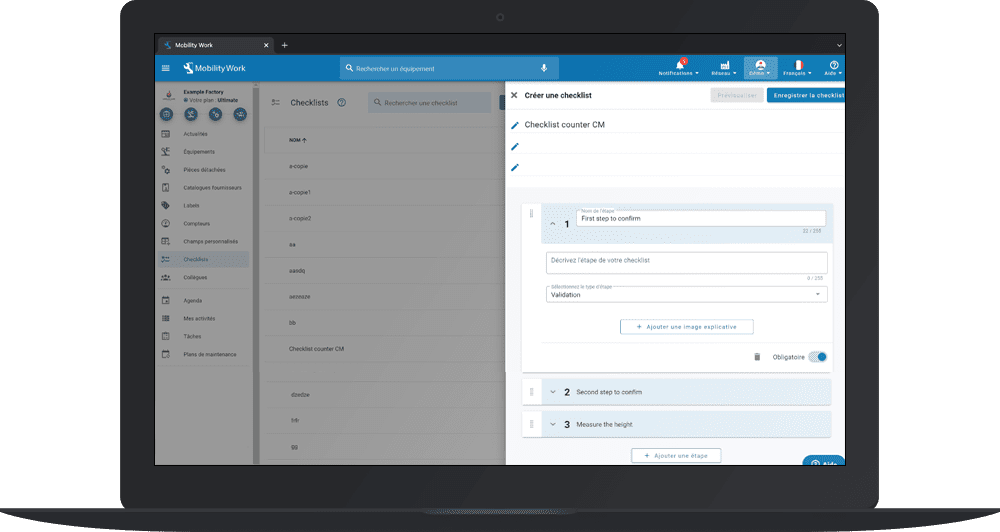
Maintenance checklists are key documents in the daily life of the maintenance department. They allow any field technician, novice or experienced, to quickly access a list of operations to be performed, then to validate each step while guaranteeing their safety. Mobility Work CMMS gives you the possibility to add checklists to your maintenance tasks.
Why integrate checklists into your CMMS?
La checklist management is essential for the maintenance department, but also for management seeking to collect valuable information, which will then be analyzed for the sake of continuous improvement. Checklists also allow you toimprove communication between teams and departments, of Ensuring safety operators, to keep a historical, ofoptimize maintenance practices, etc.
If the maintenance checklist is an essential document, so is the choice of its format. The checklists in digital format available in your GMAO (computer-aided maintenance management) have the advantage of being accessible at any time. Digitizing this feature has a number of benefits. The documents are all accessible in the same place, which also makes it possible to prevent risks loss or destruction of documents, as well as to report information to other technicians and service managers in real time.
With the mobile version of Mobility Work CMMS, field technicians can consult and validate checklists at the foot of the equipment in order to ensure optimal retrieval of information. They can thus carry out inspections, establish compliance reports or carry out equipment maintenance interventions. All they have to do is check the tasks carried out directly in their CMMS, to provide comments or toadd images of the condition of the equipment to document the information report.
How to create a checklist in Mobility Work CMMS?
Creating a checklist will only take a few moments. From the home page of your CMMS, click on the tab Checklist, on the left side of your screen. Enter the name of your checklist and all associated steps. You can then add your checklists when creating a new task.
Learn more about creating tasks
Import all of your maintenance ranges and maintenance checklist into your Mobility Work CMMS for free from your Excel files.
Personalize your checklists
Adapt your checklists to your sector of activity
All industries have their own standards and regulations to ensure the safety of operators, ensure optimal efficiency and the application of best practices. The maintenance checklist available on the mobile version of your Mobility Work CMMS helps you to ensure the clarity and efficiency of the procedures. Mobility Work CMMS offers you the possibility to easily customize your checklists according to your needs. For example:
- HVAC and refrigeration services : automatically generate your preventive maintenance work orders with checklists and never miss a step;
- Facility Management : document your service levels, ensure that the data collected is sent to the right place, and execute your preventive maintenance plans;
- Regulatory : generate comprehensive checklists for corrective actions and compliance reports;
- Audit and inspection : create simple or multi-page forms with rules very quickly and efficiently.
Did you know that? The use of checklist maintenance is also particularly relevant as part of a maintenance routine. preventive maintenance. In fact, carrying out simple maintenance operations, sensor readings, meters, etc. helps to anticipate equipment failures. Any anomaly is quickly detected before it becomes a more serious failure.
Customize your checklists to facilitate the work of your technicians
Mobility Work CMMS maintenance checklists are customizable and adapt to many daily situations of the maintenance team. So you can create as many steps as needed in order to easily guide your technicians, but also to integrate them to limit the workflow. It is also possible to insert specific data fields in the creation of your checklist in order to:
- collect data on inspection reports, maintenance calls, or calibrations;
- require technicians and subcontractors to enter data to move forward on their checklist, which allows you to obtain a detailed final report for your customer;
- collect date and time stamps for any checklist process;
- take photos before and after repairs to show that the work is complete;
- gather data points, such as calibrations, temperatures, and pressure for an accurate report.
Finally, the checklists available in Mobility Work CMMS allow you to manage and monitor the work of your technicians, but also that of service providers. Standardize your standards and procedures to improve them! Step-by-step checklists allow each technician or subcontractor to do the same job every time.
5 advantages of managing your checklists from your CMMS
- Quickly detect the most critical equipment: when equipment does not function properly, its use generally leads to a higher risk of damage, accompanied by financial losses, either as a result of an accident or due to mechanical problems. Thanks to the checklists, keep track of the inspection steps that guarantee its proper functioning.
- Benefit from accurate information to plan your preventive maintenance. Equipment wear and tear does not necessarily mean failure. By determining how often to repair a type of equipment, it is possible to plan this repair in your maintenance management software before the failure, thus reducing costs and downtime.
- Identify recurring equipment problems and fix them. Inspections provide you with the data you need to predict failure trends and identify causes. Often, when equipment has a recurring problem, it is due to systematic misuse; inspections shed light on this operational problem.
- Encourage production staff to take care of equipment. Regular inspections directly involve production personnel. Indeed, inspections before use make it possible to detect “abuse” of equipment, and thus to take measures to put an end to this behavior. More often than not, simply conducting pre-use inspections encourages staff members to pay more attention to the condition of their equipment.
- Improve your decision making. The inspection data on the durability and performance of your fleet in your maintenance solution helps you assess the equipment and answer the question “should you maintain or replace?” ”
Vous avez des questions ?
Contact us to discover the first CMMS that can be deployed in 3 weeks.