Create your equipment and manage the nomenclature of your machine park
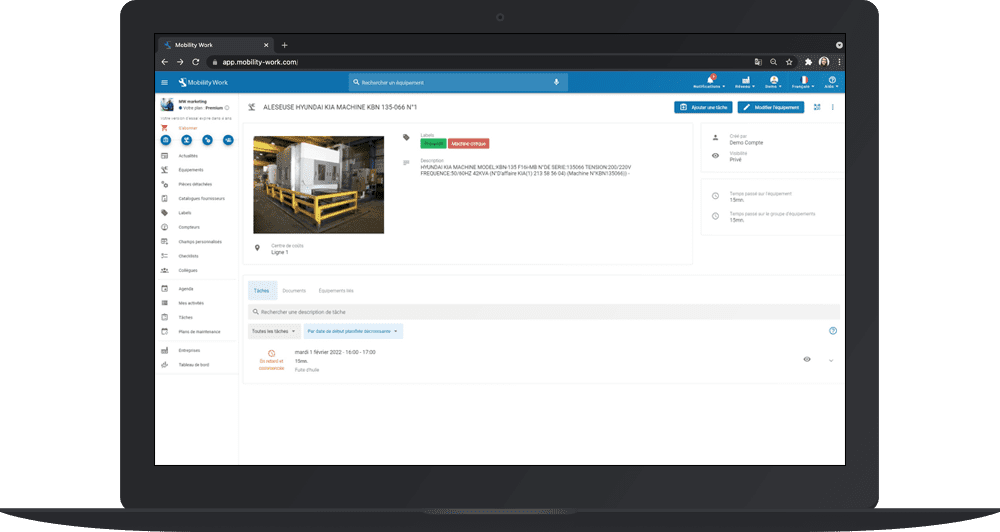
Adding your machine park and creating the nomenclature of your equipment can be complicated and tedious with traditional maintenance management software. Nothing could be easier with Mobility Work CMMS: 2 minutes is enough!
How to add your machine park to Mobility Work?
For add new equipment, several options are available to you.
The application's “add equipment” function
Based on our experience, we have redesigned the way we create our machines in order to avoid the known failures when setting up other maintenance software. First of all, we have reduced the entry to a few fields in order to centralize the main information of the equipment:
- The photo of your equipment;
- the name of your machine (see the paragraph “How to properly name your equipment”):
- The description, which includes all the information about your equipment (see the paragraph “What information should I enter in the description of my equipment? ”).
- a cost center, which will represent a geographical or financial area of your equipment.; in general, the equipment cost center corresponds to the financial division present in your ERP.
- labels, or tags, to classify several pieces of equipment in a group: for example, you can tag all your lifting devices, or all the equipment in line 12.
- create a link between your equipment : you can link your equipment together in order to facilitate nomenclature and create a structure between your different machines.
- determine the level of confidentiality of your equipment : you can choose to keep it private, to share it with other factories in your industrial group or with the community. You are in control of your data: no information concerning the name of the factory, the cost center or the name of the participants appears on the equipment sheets.
- inform that this equipment is a spare part, including the quantity in your stocks, the location, the minimum and maximum stock, as well as the unit price. You can also connect your spare parts to your ERP to obtain this information automatically.
Consult the community's machine park
Mobility Work is a community maintenance management platform that allows you to anonymously consult information from a public equipment database. Why create a machine if someone has already created it for you? All you have to do is search for your equipment with the search function of your CMMS and to consult the sheet of the equipment you are interested in.
If it fits your needs, click “duplicate” and retrieve the various information (name and description) of this machine automatically. You can also edit duplicate information and enrich your equipment information with a photo, nomenclature, cost center, labels, links to other equipment, and determine if this machine is private or public.
Duplicate equipment from the official manufacturer's catalog
At Mobility Work, we believe that it is not up to the user to enter information from his machine into the CMMS. So we allow each manufacturer, supplier or equipment manufacturer To insert sound official catalog. The objective? Allow you to find your equipment in a few minutes, with a complete description, documentation, spare parts, maintenance plans and manufacturer ranges.
Import your machine park from an existing database
Do you already have a fleet of machines? The Mobility Work team offers youimport data extracted from your old CMMS for free (Excel file or database) in the application in order to save you time and allow you to test our maintenance software more quickly.
How to optimize the name of your equipment?
Choosing the name of your equipment in a CMMS is never very easy. Here are a few tips that will allow you to optimize the naming and nomenclature of your equipment.
Take the example of a translation motor Leroy Somer LS 71 present on an OMIS 16 Tonne No. 161 bridge in the fusion sector of your factory. Its name could be: “Leroy Somer LS71 Engine — Translation — Translation — Omis Bridge 16 Tons — No. 161 — Fusion Sector”. In this way, if you search for the words: “bridge motor 161”, or “engine translation bridge OMIS 161”, you should quickly find your equipment.
The name of your equipment in your CMMS can be summed up in the following diagram: “Type of element — Make — Model — Location (if it is a spare part) — Equipment number — Geographic sector or production line”. It works like a nomenclature, but with keywords. You can thus determine, for example, the time spent on all the equipment including the keywords “engine” or “fusion”. You can also add tags with a number or a nomenclature on each equipment accompanied by an NFC tag or a QR code in order to facilitate the authentication of your equipment.
Create your equipment sheets in Mobility Work CMMS to trigger tasks and activities
What information should I enter in the description of my equipment sheet?
Any type of information can be added to the description: type of element, type of contract, type of contract, serial number, nomenclature, etc. With traditional maintenance software, it is necessary to fill out an equipment form containing more than 150 fields. However, not all machines have the same characteristics. This excess of information is often an obstacle for the team responsible for deploying CMMS in a maintenance department.
That's why Mobility Work works according to the logic of current search engines.Simply add the information and keywords in the description, and easily find your equipment using the search function.
Finally, thanks to the mobile application, geolocate your equipment by indicating the GPS coordinates of the latter. Thus, your teams or service providers will be able to locate your equipment directly from the Google Maps application on their phone.
Vous avez des questions ?
Contact us to discover the first CMMS that can be deployed in 3 weeks.