Manage your service providers in your CMMS
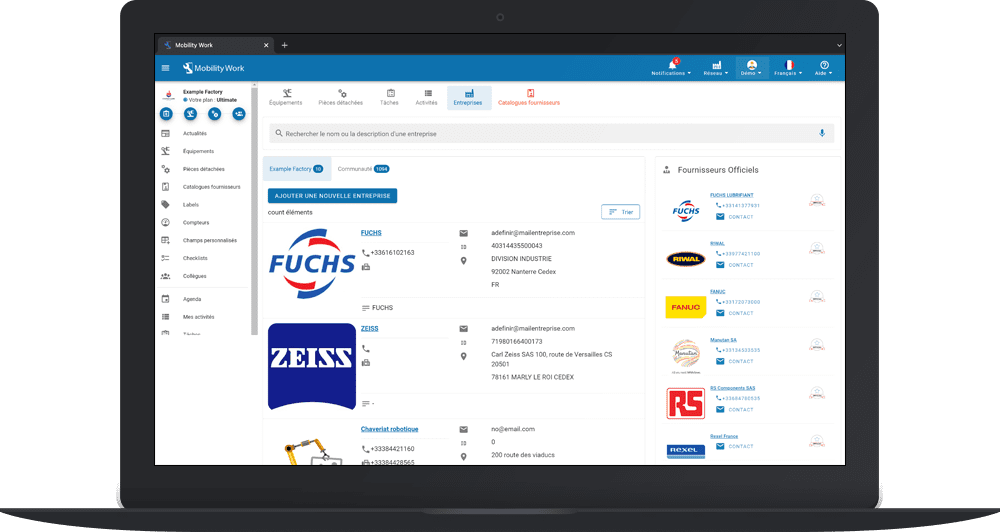
La management of service providers is part of the daily life of maintenance managers. Unfortunately, many officials still face many difficulties today. The multitude of interlocutors makes follow-up complex. However, the tools of GMAO traditional methods do not promote the aggregation of this information. Mobility Work, a community maintenance management platform, allows you tointegrate service providers into your network.
Manage your network of service providers using a CMMS
Maintenance is increasingly outsourced, whether for maintenance operations, industrial processes, ancillary equipment or even buildings. It can include preventive and curative maintenance operations or even regulatory controls.
Many maintenance managers are thus confronted with the difficulty of managing these service providers and their activities. This is due to the large number of service companies with which they may be required to work. Monitoring service provider interventions, scoring them, storing intervention documents and comparing service providers with other maintenance managers are often difficult elements to set up.
One of the objectives of the Mobility Work community CMMS is to allow maintenance managers toimprove the monitoring of service providers. For this, our application has a service provider management function. To access it, simply access the “search” tab and create a new company sheet.
How do I add a new business?
In Mobility Work CMMS, the company sheet is composed of various fields:
- Company name
- Company email
- Siren or siret of the company
- Company address
- Company postal code
- Company city
- Company country
- Company phone number
- Company fax number
- Company description
- Company logo.
Once all of this information is filled in, simply click on the “create” button, and the company will appear in the list of your companies in your CMMS as well as in themaintenance community directory Mobility Work. You can edit company information at any time.
Each company created is publicly accessible to all Mobility Work users. It is also possible for you to Duplicate a company file present in the community or the official file of a service provider.
What information is required to add a contact to the company I just created?
In Mobility Work CMMS, a contact's form is composed of various fields:
- Name of the provider
- Name of the provider
- Provider email
- Provider country
- Provider phone
- Mobile phone of the provider
- Provider address
- Provider description
- Photo of the provider
How do I add a service provider to my Mobility Work CMMS?
You can add a service provider to your CMMS at any time and monitor its maintenance interventions. To do this, simply create a user and associate it with the “service provider” profile. The provider profile can access the activities of its members, and create activities on tasks to which he has been assigned. This profile offers restricted access to the information in your Mobility Work CMMS software: it can only see what you have given it access to. Once your provider is created, you can add it to the list of company members.
How do I monitor my service provider's activity in CMMS?
In the “tasks completed” tab, you will be able to view all the interventions carried out by the service provider, with each time the description of the intervention with the name of the equipment, the date and the time spent by the technician. You can then rate the maintenance service according to a set of criteria (costs, quality, safety and time) and add a comment. In this way, each company obtains an average visible on the company sheet by all members of the Mobility Work maintenance community. Attention, no information relating to the intervention (name of the equipment, description of the intervention, etc.) is accessible to people outside your company.
How do I consult a community provider?
You can search for a service provider at any time using the search function of your community maintenance management platform. You can find a service provider thanks to his name, description and above all, according to his history of maintenance interventions on various machines. Thus, all you have to do is enter the keywords corresponding to the provider's profile or activities.
Management of service providers in CMMS
What benefits can the management of Mobility Work CMMS software service providers bring me?
Many benefits can be measured quite quickly on the management of your maintenance:
- traceability and control of the operations of service providers;
- archiving and historization of the work carried out by the service providers;
- information on service providers accessible to all persons in the company;
- rating of service providers and comparison internally as well as in the Mobility Work maintenance community;
- improving the monitoring of maintenance contracts and the management of equipment under warranty;
- discovery of community service providers working on machines similar to yours.
What is the cost of service provider profiles?
There is no billing on the users' provider profile. All you need to do is contact our team to create their profile.
What type of maintenance operation can I track in my CMMS?
All the types of maintenance operations of your service providers can be traced in Mobility Work CMMS:
- technical shutdowns;
- curative maintenance;
- revamping;
- preventive maintenance;
- regulatory management.
What type of service provider can I find in the Mobility Work community?
Find a whole range of service companies in the Mobility Work maintenance community directory. Below are a few examples:
- Industrial maintenance
- Industrial equipment repair
- Boilermaking
- General mechanics - custom work
- Industrial pipework
- Steels and metals - machining
- Cleaning - services
- Heavy metal construction
- Automation - installations and equipment
- Electricity - works
- Industrial cleaning
- Industrial heating - installations and equipment
- Tubes and pipes - non-ferrous metals
- Lightweight metal construction
- Engineering - industrial contractors
- Electrical installations
- Engineering - industrial design offices
- Machine tools - metal machining
- Industrial removals
- Electric motors and parts.
Vous avez des questions ?
Contact us to discover the first CMMS that can be deployed in 3 weeks.