Discover the public API functionality of Mobility Work CMMS

While CMMS (computer-aided maintenance management) software allows companies to centralize their maintenance and harmonize their processes, mobile and new generation solutions such as Mobility Work are revolutionizing uses. Today we present to you our feature ofPublic API, which helps field teams benefit from greater visibility on inventory while they carry out maintenance tasks.
What is an API?
The term API (Application Programming Interface), or application programming interface, refers to “a computer solution that allows applications to communicate with each other [...]. In reality, it is a set of functions that facilitate, via a programming language, access to the services of an application” (Journal du Net).
What does this feature allow?
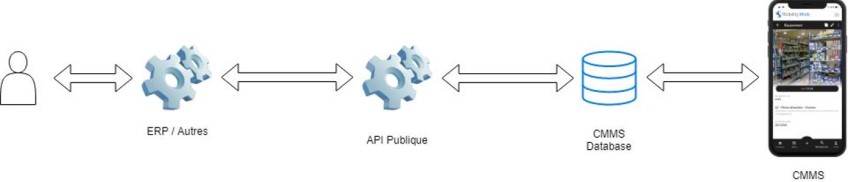
This brand new feature allows connect different tools to Mobility Work, such as for example a ERP or MES software. As a result, some actions, which were previously managed manually by users, may be completely automated within the platform: the feedback of stock or indicators, the creation of tasks, the importation of spare parts, etc. More specifically, users will be able to easily update their stocks so that the information is visible in their CMMS software.
How it works
To use this feature, you need to identify the people within your organization who will be able to take charge of this component. You can therefore either turn to your IT department in order to set up the operating solutions of this API, or directly designate a person in the teams who will be in charge of creating an account on our maintenance management platform and managing this component.
Whatever tool you want to communicate with CMMS (an ERP or CRM, an MES, an Excel or Google Sheets file, etc.), the public API allows you to update your inventory and create tasks.
Your API account
By subscribing to an API account, you have rights equivalent to those of a network administrator, in addition to access to the public API. Since API accounts are intended for third party use and sometimes outside a network, the identifiers that will be provided to you will not allow you to connect to the platform if the feature has not been activated. At the same time, the CMMS user account does not allow the use of the public API, in order to guarantee an optimal level of security.
ERP and CMMS: Manage spare parts stocks using APIs
Documentation
The aim of this new feature is once again you guarantee a great deal of autonomy. In this sense, you will find all the information and documentation you may need directly on the interface. All users or solution integrators thus remain independent as to the use of the feature.
Use cases with CMMS
More concretely, your first use of the API is divided into three main steps. Once your needs and the tool you want to connect have been identified, all you have to do is order a license by contacting our team.
Then comes getting started with the API, where you can test the functionality and use it manually. It is important to note that The API only supports standard JSON format for the integration of your data. As an integrator, you will then access the endpoints listed on the documentation page in order to perform the various actions you want. Once the various steps have been completed, the information simply goes back to the CMMS and the technicians and field operators have this data. For their part, our teams monitor the process to ensure that everything works well.
To start using this new feature and monitor your stock levels from your CMMS, go to the API page and contact our team to get your access!
Any questions?
Contact us to discover the first CMMS that can be deployed in 3 weeks.