CMMS or Excel: what is the best solution to manage maintenance?

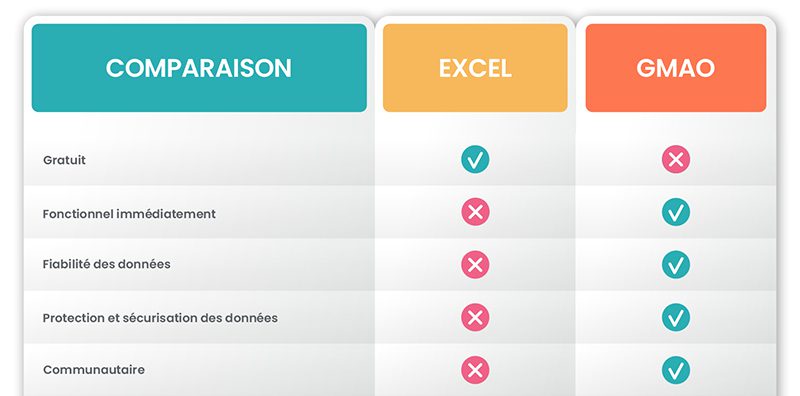
The Excel spreadsheet has long been the main IT solution for maintenance management. But technological progress has allowed the appearance of software specifically dedicated to CMMS (Computer-aided Maintenance Management), with functionalities much more developed than Excel.
However, many businesses still use Excel to manage their maintenance, rather than a specific solution. For what reasons? And are they doing the right thing? Here you will find all the information you need to choose between Excel and a CMMS software to manage your maintenance.
Advantages and disadvantages of maintenance on Excel
Starting to use an Excel file to oversee maintenance is often the first step in computerizing technical services. This method saves valuable time compared to using paper documents, but it also has a number of limitations.
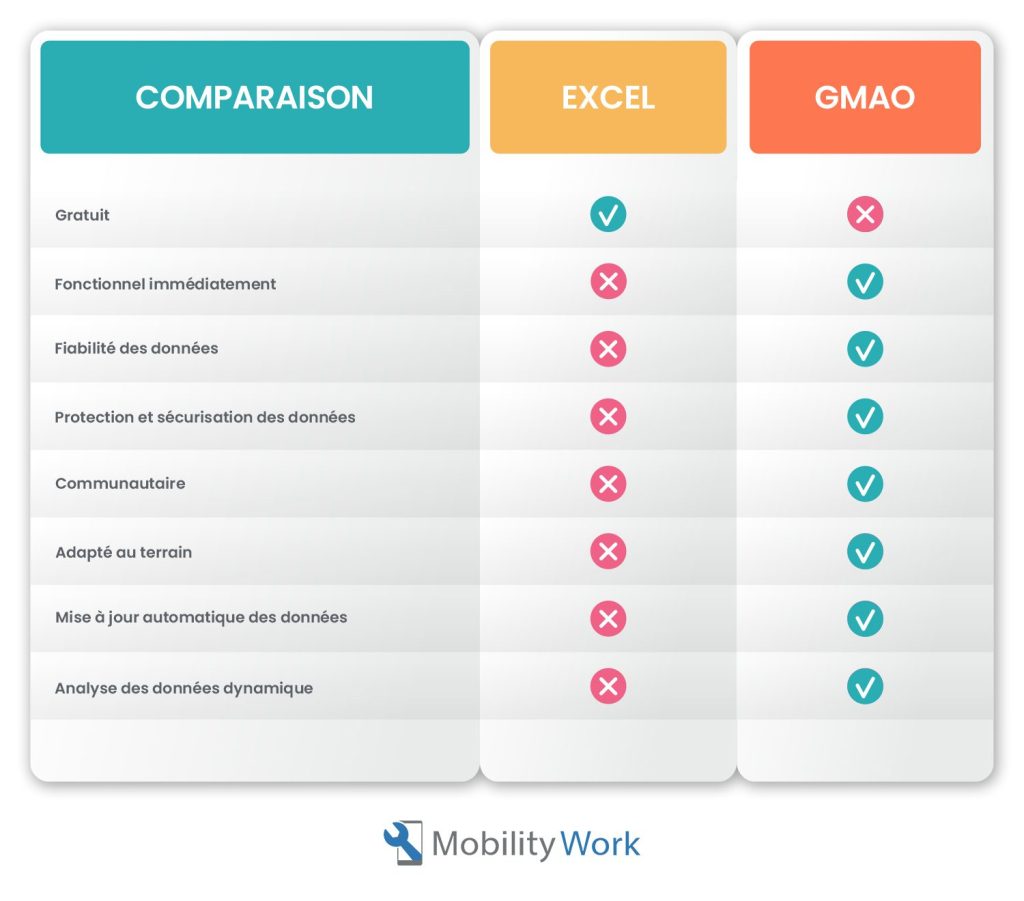
The advantages of using Excel rather than a CMMS
Maintenance management can sometimes be done simply using a fairly complete Excel file in order to note the schedule of technician visits to equipment and various other key elements necessary for monitoring: vehicle management, inventory monitoring, overview of human resources workload, etc.
Microsoft software is a real Swiss Army knife. Ideal for providing results, analyses, planning interventions or even carrying out entire processes, it has undeniable qualities.
The most obvious benefit of using a spreadsheet for maintenance is that This method is easy to set up. It is in fact not necessary to be an expert in spreadsheet software to thus have a small tool for monitoring maintenance interventions. For small businesses that seek to improve their maintenance management at very little cost, Excel is thus the tool most within their reach, on the one hand because it is “free” (because they generally already have it), on the other hand because they can use it without using an external service provider or training their employees.
In addition, this tool offers great flexibility to fill in any type of information, it is easier to transmit to a collaborator than a paper document, and neither the file nor the software are likely to quickly become obsolete.
The disadvantages of using Excel for maintenance
However, Microsoft's famous spreadsheet has major drawbacks.
A negative impact on productivity
The first is that it hampers team productivity. In fact, data processing, management and analysis require a lot of time as soon as they reach a certain volume. In addition, the risks of errors are quite high, which affects the reliability of the data and the use that is made of it.
The forced centralization of information
In addition, a spreadsheet promotes the centralization of information. Indeed, it is often complicated to share files in real time., while the planning of maintenance actions should generally be collaborative, since it involves a constant exchange of information. It also requires real-time updates that are impossible with Excel, because it is cooperation with field teams that guarantees the quality and accuracy of the data.
While the optimization of maintenance activities depends on the involvement of all employees, the use of Excel requires a single person to centralize the data, often collected on paper documents by technicians. The spreadsheet tool is therefore poorly suited to teamwork and collaborative management and can negatively impact the efficiency of operational teams..
A tool that is not very mobile
The teams of technicians are constantly mobile. They know that their effectiveness depends greatly on the good flow of data and information, if possible in real time. However, using Excel to manage maintenance does not meet the need for mobility of maintenance technicians. Indeed, this software is really not suitable for use on a smartphone or tablet.
Is CMMS really better than Excel?
As we have seen, using Excel to manage maintenance has many drawbacks: the software is not dynamic, it was not designed to manage the unexpected, it does not adapt to the agility of teams, etc. Spreadsheets therefore do not allow you to work in real time or to collaborate effectively. But do all CMMS solutions necessarily do better than Excel?
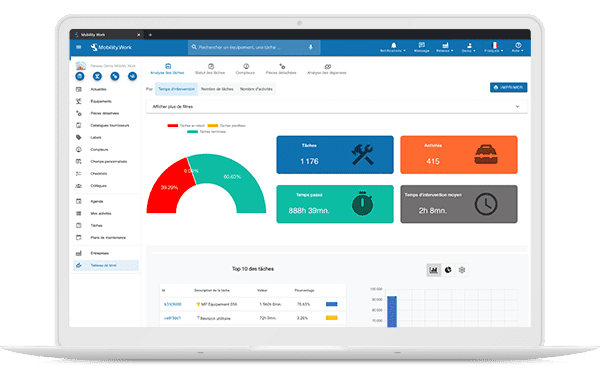
Find an analytics tool in Mobility Work to analyze all your maintenance data and adapt your strategy
What is traditional CMMS software worth compared to Excel?
Adopting dedicated software makes maintenance management much simpler and more efficient. But it also has some notable drawbacks.
What is a CMMS software?
Computer-aided maintenance management software is a computer program specifically developed for manage and rationalize equipment maintenance within a company. Most of these solutions make it possible to manage equipment (inventory, location,...), their maintenance, stocks, maintenance personnel, costs, performance indicators, etc.
Advantages and disadvantages of traditional CMMS solutions compared to Excel
Conventional solutions facilitate the management of equipment maintenance thanks to features specifically designed for maintenance. Their objective is to enable their users to benefit from better productivity, by reducing periods of machine inactivity, better cost control, by extending the life of equipment and by anticipating future expenses, and better traceability, by facilitating the recording and consultation of interventions.
However, in practice, these programs often prove to be complicated and expensive to set up and use. Indeed, they are cumbersome to configure, require long weeks of team training, are complicated to use and are very limited in terms of mobility.
While they are supposed to facilitate the work of maintenance operators, these solutions therefore too often have a demotivating effect on them and lead to a lack of involvement in their implementation and use. There are thus many examples of companies that wanted to adopt a CMMS software but found facing major difficulties, both in the technical installation and in the appropriation of the tool by the teams.
Is next-generation CMMS the best solution?
The Mobility Work maintenance management platform completely changes the approach to industrial maintenance by applying the same logic as everyday uses. It thus benefits from a optimal ergonomics designed to make it easy to use from the first contact. Therefore, its appropriation by the teams is very rapid and encourages their motivation to use it.
In addition, the Mobility Work application is also tremblant. This means that it can be used from anywhere on a smartphone or tablet. Maintenance operators can therefore consult the history of operations and enter their intervention reports in real time, including when they are offline, which considerably increases the reliability of the information.
In addition, this maintenance management platform has a community operation inspired by social networks. This particularity is a major asset for facilitate the sharing of information and facilitate exchanges within the teams involved in maintenance. Companies can even choose to share the information they want with other users to benefit, through the Mobility Work community, from numerous feedback on the maintenance of the machines they use.
Finally, integrated Big Data provides all users of the application with an unparalleled ability to analyze machine maintenance, based on data collected within their network.
If we add to these characteristics a much lower cost than old solutions And a personalized after-sales support, it is obvious that Mobility Work's new generation CMMS represents an unprecedented and incomparable compromise between classical CMMS and Excel, between ease of implementation and use, reduced cost and efficiency in maintenance management.
Any questions?
Contact us to discover the first CMMS that can be deployed in 3 weeks.