Danone Opole chooses Mobility Work for the management of its spare parts, documents and preventive maintenance
As world leader in dairy and plant-based products, and second in packaged water and child nutrition, Danone brings health through food all over the world. They use Mobility Work To ensure effective maintenance management.
Danone's largest factory, Danone Nutricia, located in Opole (Poland), produces baby food with various technologies, such as infant formulas, meals, soups and desserts in jars, fruit gourds, and soon products in the category of foods for special medical use for tube feeding patients. As a showcase for digitalization, Nutricia Opole is at the forefront of Danone's digital initiatives. The factory chose Mobility Work for spare parts management, information management, and improved preventive maintenance because the application is modern, easily accessible, and user-friendly.
Kamil Ciepiela, Digital Manager, and Alina Tychon, digital transformation specialist, have agreed to share their experience with implementing the solution and the benefits they are beginning to measure. We were impressed with how they handled the deployment of the application!
What are the main challenges your business is facing?
Our great advantage and at the same time our challenge is our complexity. We have 6 different buildings, over 600 machines and over 60 technicians, and we are still expanding.
We have 3 teams, from 1 to 3 technicians per department (each department representing a different production technology).
What were the main issues faced by your maintenance team prior to implementing Mobility Work?
The first problem was management of documents and spare parts stock. The previous process was very complex and the system did not offer a good user experience, which led to the establishment of new solutions to improve processes.
How did you manage maintenance before using Mobility Work?
We used an old, simple SQL database, developed in-house to log interventions on machines and technicians used Excel as an interface to communicate on spare parts and transfer data to our ERP.
With the increase in the number of equipment and technicians in the current environment, this system was no longer adapted to our needs. The day we started using Mobility Work, the old system was abandoned.
What does Mobility Work offer you? What are the benefits of this CMMS for your factory/business?
The main advantage is that we have, in one place, all the information on our equipment and spare parts with documents, photos and user feedback.
Four months after we started using Mobility Work, we can already measure some improvements:
- Tasks (work orders) can now be created On mobile phones, which allows us to Save time by avoiding going back and forth to the office.
- It's easier for technicians to perform tasks on machines that already have basic data, photos, and documentation in place, which reduces intervention time by around 5 to 10% on this equipment.
- We have seen an increase in the percentage of preventive tasks in relation to corrective tasks.
- Managing spare parts and store withdrawals is much easier with Mobility Work. Technicians simply scan the part with their phone and search for it in the catalog.
- We also have a clearer view of which spare parts to order for interventions.
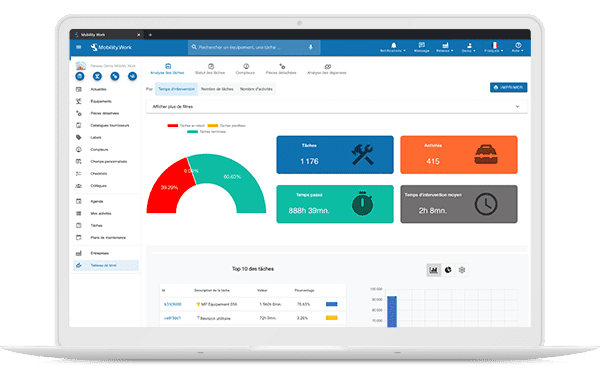
The analysis tool in Mobility Work CMMS
How did the implementation and integration of Mobility Work take place? How long did it take for your technicians to adopt the tool?
The implementation took place very easily And lThe support from the Mobility Work team throughout the process was great.
We have set up A project team including:
- A global project manager
- A person responsible for managing the knowledge and well-being of the project team, responsible for communication, collecting user feedback and planning next steps
- The best technicians in the field: we have formed a community of key users with at least one person per department with a thorough knowledge of the application and one person of authority in maintenance.
A key moment of the project was the visit of Frédéric, the Onboarding specialist at Mobility Work. We organized a training day on site with almost all the key users. He showed us all the tricks.
After that, we developed a training program and spent a month training technicians individually. It was an investment, but we are glad we did it because it already paid for itself. Today, we are working on feedback.
Everyone is now using the app, each in their own way. Some prefer the computer version, others only use the mobile application. The voice control function is particularly appreciated by our technicians!
We have made mobile phones and tablets available so that technicians can choose the hardware they prefer, which is essential for the adoption of the tool.
We also decided to give a live demonstration to our plant manager to show him how it works in real time.
The whole process took 3 months, but the user adoption phase (from training to full use) lasted about 6 weeks.
What are the next steps planned with Mobility Work?
We want to create BI reports using the Mobility Work Data Connector tool.
We are also planning to integrate Mobility Work with SAP for inventory management.
Finally, we will soon be producing FSMP products and are starting to use Mobility Work to prepare for the monitoring of requirements specific to this product category.
A big thank you to Kamil and Alina for their testimony.
Any questions?
Contact us to discover the first CMMS that can be deployed in 3 weeks.