UX Series 25: Mobility Work at Safran


In aeronautics, adopting a CMMS is more useful than ever to optimize maintenance management and gain in productivity. Jerome*, maintenance manager at Safran, told us about his experience in setting up a Next Generation CMMS.
Descendant of Snecma and Sagem, Saffron Is one of the jewels of French industry. This major group is present internationally in the fields ofAeronautical, space and defense. On the site of Loches, in Indre-et-Loire, its Safran Electrical Components division produces nearly 2 million electrical harnesses every year that equip landing gears. This industrial site, which is unique in the world, is renowned for its expertise in the manufacture of cables and protective elements capable of severely severe environments, such as in-flight refueling hoses.
We meet Jerome*, Maintenance manager Experienced, who has been in charge of all the machinery and production parts of the site for over a year. He explains to us why and how his industrial site adopted Mobility Work CMMS to optimize its maintenance management.
Did you already have a CMMS for maintenance management before adopting Mobility Work?
No, the old maintenance management system was not really a CMMS: it only allowed intervention requests to be made through computer tickets, but it was a software that was designed for IT or IT services, not for industrial maintenance. We couldn't manage stocks for example, and we just had a small historical part.
Inventory management was done separately, on Excel files or other types of media. There was no preventive maintenance, no dashboards... It was very laborious: for example, if you wanted to extract or retrieve data, you had to do cross tables, it was complicated.
Did you participate in the transition from the old maintenance management system to the new CMMS? How long did it take to deploy Mobility Work?
Yes, I arrived just before the change. We made the transition a month after I arrived.
We needed Around 15 Days to Set Up the New CMMS software at the production level, to give access and authorizations to intervention applicants, etc., and to be operational in its use. During these 15 days, we worked in parallel with the two systems, the old and the new.
How did the adoption of Mobility Work CMMS happen by regular users in your factory?
At the level of our team of 4 maintenance technicians, we were all demanding so we quickly adopted the tool because we knew everything it brought us compared to what we had before.
On the production side, therefore Applicants for Intervention, it also went well, because the handling is very easy compared to what we used to use. In 3 or 4 clicks, they can Create an intervention request, whereas it was much more complicated before. As a result, they too quickly adopted Mobility Work, and the implementation was no problem. The production teams understood the value of changing the maintenance management system and they all went in the same direction.
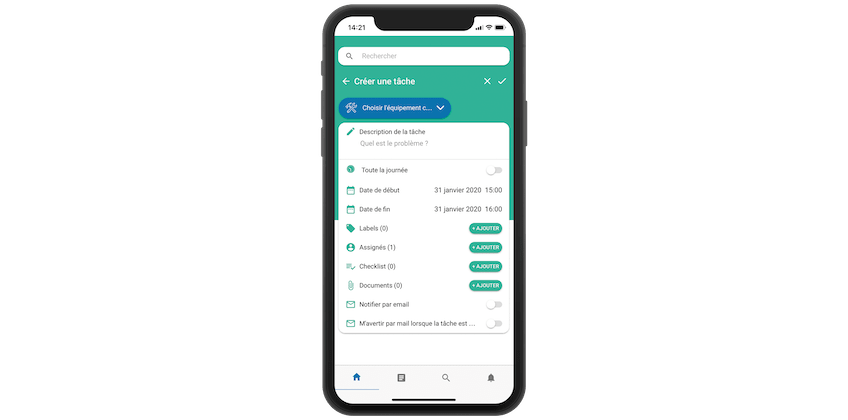
Quickly create an intervention request with mobile CMMS
How did you import your old data into your new CMMS?
Someone took care of doing Excel extractions from our old system, which allowed us to pre-fill the tables that Mobility Work had provided us with. These were transfer tables for Import our data into the CMMS and be able to recover part of the history we had.
We also had files in Excel format on spare parts stocks, we were able to quickly import them into the new CMMS. It just required a little bit of formatting work accordingly. Once we submitted our data, the Mobility Work Team integrated it into the software very quickly, in less than a day.
Was this ability to quickly import your data an important point for you?
Yes, it was something that mattered. This allowed us to retrieve a history, to have data, to reintegrate our spare parts management file. All of this was crucial for us, so as not to lose the data that had been accumulated previously.
Even if today we realize that we really had little data with our old system compared to all the data we have today, for example with labels, cost centers, etc. thanks to Mobility Work.
What other arguments convinced you to adopt Mobility Work?
The game Maintenance community Interested us, in particular for the possibility of Sharing Data and Information, to solve problems and breakdowns, to find other companies or service providers with whom to discuss the problems we may encounter on our machines.
All of this weighed in the balance when choosing a CMMS solution. Today, we regularly turn to the community to Find suppliers equipment, for example.

Find suppliers in the official Mobility Work catalog
What has the implementation of Mobility Work changed for you?
You should know that we were starting from afar, since before Mobility Work we used a system that was not at all suitable for maintenance. For example, we had no dashboards and very few functionalities. It was very complicated toAnalyze the data.
Mobility Work has given us a lot in this regard. In a few clicks we have access to all the dashboards. The charts”Top 10” Allow us to quickly focus on what is causing the problem, to be able to target the real dysfunctions and to direct our efforts according to the indicators provided by the CMMS software.
We regularly consult these indicators, in particular the evolution of the number of tasks, to see very quickly when we are starting to have drifts and when we need to accelerate on certain points to be able to maintain a certain level of performance. All of this was very difficult before Mobility Work.
On which points would you say that Mobility Work CMMS has made you the most progress?
We have gained a lot in traceability, in efficiency and in reactivity. Lately, we've started using the Mobility Work app even more for questions related to Security : regulatory controls, the management of these controls thanks to the reports recorded in the CMMS, to have a maximum of Traceability without having to keep maintenance logs, which is very tedious. CMMS allowed us to replace these notebooks and to have more precise follow-up on the regulatory part and periodic verification. In particular, it allows us to have a schedule for Regulatory Controls.
In terms of reactivity, everything is much easier with the Mobility Work Application than with Excel, which we used before. Notifications and reminders allow us to be more responsive.
It also allows us to track information more easily. For example, a person who creates an intervention request may have more information than before, follow the work of maintenance teams in real time, and know when the equipment is being repaired. This is a big plus of the application.
Are there any CMMS functionalities that have particularly improved your daily life ?
Les dashboards, for example, are very useful for us to give feedback to production departments, or to present reports to our hierarchy. This feature saves us a lot of time. So we can easily know where we are, what is the problem, etc.
We also use Mobility Work CMMS a lot for everything related to the management of Intervention planning, team schedules, data, to make preventive maintenance, especially in relation to regulatory controls.
For the past year, we have also been trying to use the application more for Spare Parts Management. We had to review the way we name our spare parts to be able to have better follow-up every time we release a part or to link spare parts to equipment.
For a year now, we have been working on data to make even more use of CMMS for Spare Parts Inventory Management, it is an area in which we want to improve.
We also really like the Filters. For example, they are used to prepare certain meetings or to do quick extractions. Production teams also really like this function, so they can sort out and select only what they are interested in, and not get lost in all the site data.
What is your relationship with the Mobility Work Team? How do you communicate with us?
I sometimes communicate by email with the account manager who follows us, and a lot with the CMMS customer support accessible from the application. The chat system with your support team is very practical, it allows you to send a message directly as soon as you have a problem, to react immediately rather than letting things drag on. And the customer support is very responsive to take care of our requests.
Do you have upcoming projects with Mobility Work?
Yes, we would very much like to develop everything that is 4.0 technologies, for example by equipping ourselves with smartphones and tablets. Today, some maintenance technicians are already using theMobile app That they installed by themselves on their personal smartphone, and this is something that we would like to develop even more, for example to be even more reactive when it comes to validating interventions, or to be able to Add documents In the CMMS, such as photos for example, or enter more data. This is what we want to develop on our site.
Our management would also like to use the Mobility Work software for the Production tool management. Today, we don't really manage that at the maintenance department level. This is something that we would like to integrate into CMMS, perhaps by setting up additional accesses, for quality managers or production team leaders, for example. It would allow us to manage production tools, the control of tools, internal or external, with the application.
A few words to conclude?
Overall we are very satisfied with Mobility Work, it is a very efficient tool. We came a long way given the system we had before, and we have only seen positive things since we adopted Mobility Work CMMS software.
Any questions?
Contact us to discover the first CMMS that can be deployed in 3 weeks.