Succeed in a technical shutdown in 6 steps thanks to its CMMS

The period ofTechnical stop is a key moment in the life of a factory, which is bound to a certain profitability and must ensure the good condition of its machines in order to achieve the objectives set by the management. Even if it is not a mandatory step and each factory is free to make a technical stop or not, do without it and choose to opt for a simple preventive maintenance strategy throughout the year can sometimes cause significant losses if the factory is not properly organized and does not have a CMMS software (computer-assisted maintenance management).
Equipping your teams with such software remains essential to organize your maintenance operations, ensure fluidity in communication between teams and save precious time during interventions. This is the case of Mobility Work, a new generation of mobile maintenance management software available in SaaS and social network mode dedicated to industrial maintenance. Such a solution assures you of Succeed in your technical stop and to save precious time during this period that leaves teams with no rest.
Technical arrest is therefore defined as a total cessation of production in a factory for a period determined by the latter (generally one month), during the summer. The maintenance teams take turns taking their leave, so the company takes advantage of the opportunity to call on numerous service providers and other external stakeholders. This is an opportunity to check the condition of each machine, to replace the necessary spare parts and to carry out any structural work. Preparing a technical stop is therefore a very long process that requires months ofanticipation And a organizing flawless. So how can you ensure that it will go smoothly and how can your industrial maintenance management software provide you with concrete solutions?
The technical shutdown of a factory is organized in 6 steps :
- Order the required spare parts
- Use CMMS to plan tasks and activities
- Coordinate the various service providers
- Perform regulatory checks
- Check the proper functioning of the production lines
- Taking stock
1. Order the required spare parts
The first step is to order the spare parts that will be necessary for the maintenance of machines : between the creation of intervention points on the various equipment, price requests and extremely long delivery times, the technical shutdown is prepared most of the time as early as January.
Field teams should be able to easily report their needs for spare parts to ensure that they will be available when the time comes. In addition, during the technical shutdown, office staff are often absent: it will not be possible to place orders via the company's ERP. The manager will of course be able to call the supplier directly, receive a quote and forward it, but this is a significant waste of time at such a critical moment.
What solution does CMMS provide?
Thanks to Mobility Work, maintenance teams have the opportunity to Report missing spare parts to the Purchasing Department. More concretely, the maintenance manager can for example create a detailed control task on the equipment concerned and assign the people in charge to it so that they are informed of this need. The Purchasing Department can leave the task open and only close it when the requested spare part has been received. All persons assigned to the task will then receive a notification and will therefore be automatically notified.
2. Use your CMMS to plan tasks and activities
To plan the various jobs to be carried out, maintenance managers can access, in Mobility Work, a planner. This tool allows you to see the calendars of several technicians at the same time in one place: you thus have an exhaustive and clear overview of the operations that need to be carried out and can easily move tasks, which will notify the persons assigned. This tool is very practical during technical downtime since teams rotate and certain activities sometimes need to be postponed. At the same time, all users have their own calendar in the solution and keep track of all the tasks carried out, in progress or scheduled.
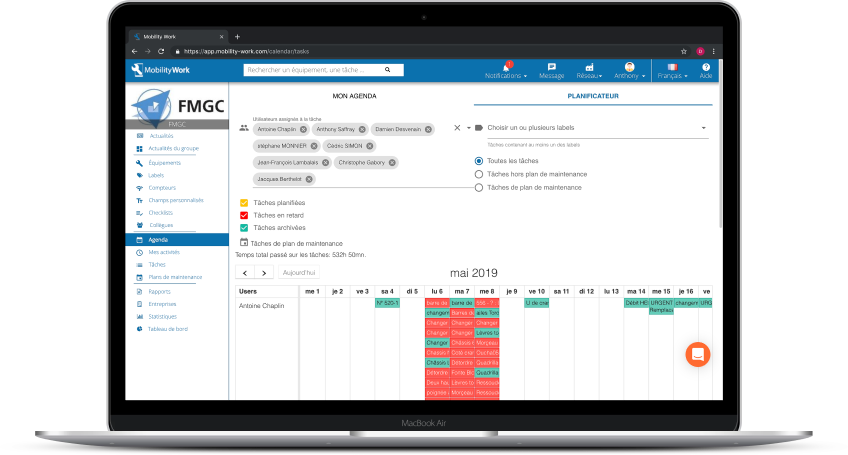
Administrators have access to a planner, which allows them to see the calendar of several technicians in the same place and to organize their days in the best possible way!
La creating tasks as such is done, at a minimum, on two levels. On the industrial maintenance side, the teams first consult to find out what repairs should be carried out before creating the corresponding tasks in their software, on the equipment sheets listed in the tool. Mobility Work users can create specific labels at this period for more clarity in their operations and thus tag the tasks in function, by selecting the period in which they must be carried out.
In a second step, the maintenance department can connect with the new works department, which will create its own tasks according to the need: investments, replacement of machines, repair of buildings... In short, Mobility Work allows the entire factory to come alive and to coordinate your needs in this pivotal period.
3. Coordinate your various service providers
Here too, it is crucial to be organized so that the interventions by numerous service providers be as smooth as possible. “When I was maintenance manager at FMGC (foundry owned by Farinia Group specialized in the manufacture of counterweights), we had 250 workers each summer on the site. We therefore had to plan everything down to the smallest detail to avoid unpleasant surprises, even if there were necessarily unforeseen events,” recalls Anthony Blanchard.
One of the major imperatives during a technical stop is to keep a written record of the hours worked by your service providers. They can fill them in themselves in the tool, but the maintenance manager can also take care of them directly: you thus follow the work of the interveners and find, as for all other tasks, all the information directly in the application's news feed.
At the same time, once you have completed the numerous safety sheets (which contain information as varied as the place of intervention, the hours of work, the potential number of days of intervention...) with your service providers, you can download them into the tasks created in your CMMS in order to protect yourself in the event of an accident.
The plus of Mobility Work
Once all the tasks have been created internally, you can associate the service providers and provide a complete description of the operations to be carried out. The Mobility Work mobile solution offers several user profiles: with a service provider account, not invoiced, your collaborators can work directly in the tool and see what tasks have been assigned to them and when they are scheduled.
4. Carry out your regulatory checks
Beyond the specific tasks that you will have planned to do and that you will have scheduled with your teams, very specific and mandatory operations must be carried out each year, and a solution such as Mobility Work helps you better understand them.
Mandatory transactions
A CMMS software allows you to better program your condition-based maintenance operations, thanks to maintenance plans for example. In addition, you can add regulatory documents on the tasks that correspond to the checks that you must carry out every year to guarantee the safety of the teams: infrared thermography, control of lifting elements (dynamic or static load tests on your bridges for example), etc.
Succeed in your audits
At this time of the year, you will also have to involve certified organizations to carry out these regulatory control operations, which will then allow you to obtain certifications. Again, your software will be of great help to you in respecting certain points, especially in terms of the environment. Indeed, more and more companies today want to adopt a more responsible approach and want to optimize their entire production chain, from design to the finished product.
Testimonial at Bericap: a successful audit thanks to its CMMS
Thus, within the framework of ISO 14000 standards, for example, such maintenance management software is an indispensable resource: you can organize yourself and fill in all the necessary information when you prepare the various containers that will be used to sort waste from maintenance operations, indicate the quantities of waste generated, indicate the quantities of waste generated, quantify this waste and estimate their impact on the company's budget, etc.
5. Check the proper functioning of your production lines
When the technical shutdown period comes to an end, your CMMS allows you to ensure that all planned tasks have been completed: Mobility Work being a community tool, thedata exchange is much easier to do. When you restart all your machines and check that the production lines are operational, you can access theHistory of machine interventions and list the smallest malfunctions in the solution.
Mobility Work being a solution mobile, it allows you to move throughout the factory and access all the data you need in a few seconds: flash for example the QR codes installed on your machines to see what operations have been carried out there. “The major advantage of Mobility Work is the time savings that the tool allows us to achieve, analyzes Anthony Blanchard. This is valid throughout the year but it is particularly true during the technical shutdown, a period that does not give us a second's break.”
6. Time for the balance sheet
At the end of this technical stop, it is time to take stock and a lot of data can be analyzed thanks to your CMMS. Mobility Work is equipped with a analytical tool, which is accessible to all users and which presents your maintenance data in the form of graphs according to the filters applied (period, users...). There, you will find the number of hours spent on your machines, the equipment that required the most interventions, the labels most used on your interventions, etc.
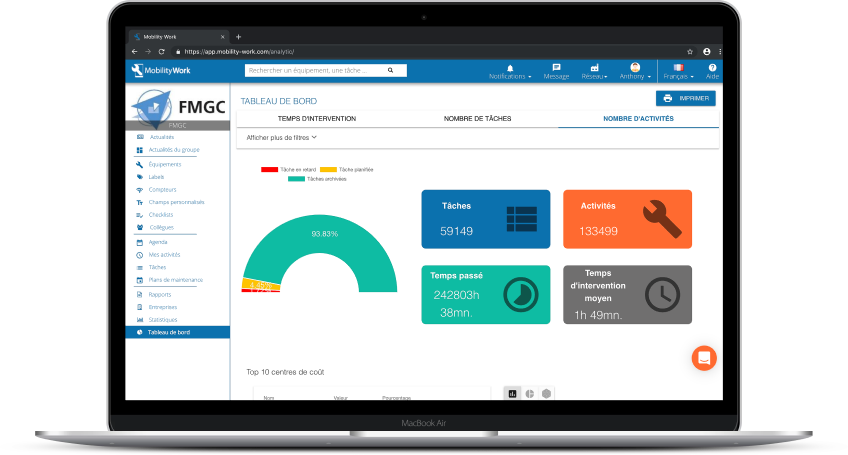
Find an analytics tool in Mobility Work CMMS to analyze all your maintenance data and adapt your strategy
Why will your CMMS be useful to you?
In Mobility Work, for example, you can create a “forecast budget” counter, which will help you monitor the evolution of expenses according to the operations carried out. This analytical tool will therefore be useful in the context of financial balance sheet carried out at the end of the technical stop: the provisional budget will have been established at the beginning of the period, and budgeting all the replacements, creating quantified tasks and adding counters to these tasks will make it possible to better monitor expenses. These counters can be monitored in the analytical tool.
At the same time, the Purchasing Department will once again be able to rely on CMMS to Invoicing service providers. At the end of the technical stop, the teams resume all the tasks carried out: if they have been properly archived, they can invoice the various service providers.
Any questions?
Contact us to discover the first CMMS that can be deployed in 3 weeks.