“A simple and user-friendly maintenance tool”


Maintenance management is an important issue for all companies in the automotive industry, a major economic sector in Spain, the second largest European producer. Angel Salas is a maintenance engineer in the maintenance and production department of the Saint Gobain Sekurit factory in Tarragona, Spain. He explains to us what the adoption of Mobility Work has changed to manage maintenance in this automotive glazing factory (windshield, side windows, rear windows and sunroofs).
How did you hear about Mobility Work CMMS?
“I heard about it from our international manager who presented us with this maintenance software. We wanted to improve and update our maintenance, especially with the theme of Industry 4.0.
What system did you use to manage maintenance before?
Previously, when there was a failure, the production operator wrote down what was happening on paper and went to the corrective maintenance station to report it. Then, the corrective maintainer would go to the machine, do the tasks, and then, back at his workstation, write down what he had done and how long he stayed.
The next day, we took all the sheets and entered them into the database of the fairly archaic and unuser-friendly software that we were using. We were wasting over an hour and a half a day summarizing the failures, because we had to write everything down on a piece of paper and then enter everything into the computer.
Now, with Mobility Work, you can enter information directly into the software from a tablet or mobile phone. You can track outages online, and see what's being done live.
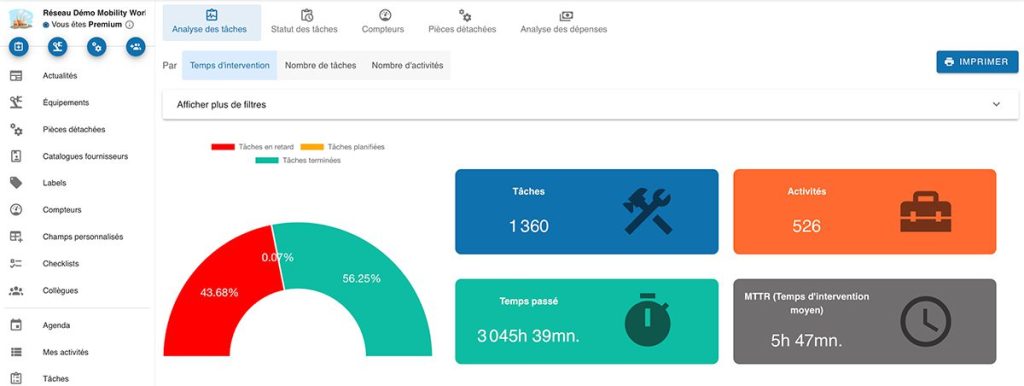
The Mobility Work dashboard
How did the system change and the adoption of Mobility Work happen?
We changed our maintenance management system in 2019. At first, it was a bit difficult, because we had to upload 4,000 pieces of equipment into the program, then almost 9,000 spare parts, we had to link everything together, classify the machines, etc.
Then, once everything was uploaded, we had to train all the operators. There was a bit of everything: some were in favor, others are still a bit reluctant to change, but now they are all used to it and are very happy with the new system.
The deployment took about 2 or 3 months, as we only had one person to download all the data, equipment, spare parts, photos, and then to train each operator one by one. The training took time because we have three teams and we only had one person to do it. Now everything is working perfectly and this simplifies the work a lot.
What do maintenance technicians think of the Mobility Work app now?
Service technicians are very happy with the app because they can see what happened from home and easily download the reports. For example, as a manager, I arrive on Monday with all the reports from the whole weekend, which allows me to go faster during daily meetings.
Thanks to the mobile phone, technicians can see the failures that have occurred on their production line, and if operators want to generate a work ticket, they can also do it and assign it to the manager.
Based on your experience, what are the benefits of Mobility Work?
For me, Mobility Work is a very simple and user-friendly maintenance software. In a few clicks, you can get all the information concerning the number of breakdowns, hours, classification. This reduces research time considerably. This makes it possible to know the statistics, for example to know if there were more mechanical, electrical, electronic failures... on which lines there are more failures. All of this in just a few clicks.

Consult all your maintenance data in a single click
Have you been able to improve preventive maintenance thanks to Mobility Work?
When it comes to preventive maintenance, we used to have it on paper and in an Excel spreadsheet; sometimes operators forgot to fill it out after a maintenance task had been completed. We now have a calendar in Mobility Work that operators can fill out directly on a tablet or computer, so no information is lost. Every operator knows what tasks they need to do every day.
Line operators have a telephone but mostly use a computer; maintenance teams use a mobile phone, a tablet or a computer at their workstation. Everyone does things in the way that works best for them.
What maintenance software features do you use the most?
The functions we use the most are creating tasks, so we collect all the failures that have occurred, this is the most important thing for us. We also use a lot of counters, with the downtime of each line for example, which is different from the maintenance activity time. For example, if two mechanics worked on the same line, the line downtime is not the same as the total response time because they worked on two machines in parallel.
We also establish preventive maintenance plans, we establish preventive maintenance routines with checklists. For example, we may plan to check equipment every X days.
What is your relationship with Mobility Work customer support?
We use chat when there is a problem with the application, for example if we have a problem scanning a report; responses are quick. I also sometimes send emails to our CSM Frédéric, to ask him for improvements, and he always answers me quickly to tell me how it is going.
In general, I am very satisfied because the answers are always quick, sometimes the solution is not immediate but we always have quick answers and information.
Do you have projects with Mobility Work in your company?
Yes, now we want to switch to premium licenses, because for example with the starter license we cannot insert photos in checklists or on equipment sheets, which is very interesting for production personnel. This will make it easier for operators to identify the equipment. Our international manager is also working to put SAP in touch with Mobility Work CMMS.”
A big thank you to Angel Salas for his testimony and to Saint-Gobain Sekurit for their loyalty!
Any questions?
Contact us to discover the first CMMS that can be deployed in 3 weeks.